Not tested. This is a research score for the documented features, compatibility and ownership trade-offs discussed in this review, not a performance measurement.
Features & capability 30%8.3
A dedicated player with broad documented format support can improve a specific viewing routine.
Compatibility & connectivity 20%8.5
The Ethernet and Thread model provides useful distinctions; end-to-end equipment compatibility remains necessary.
Ownership & upkeep 20%8.0
A contained hardware setup is appealing, while service subscriptions remain separate costs.
Setup & everyday use 15%8.4
Dedicated remote controls support a coherent proposition, with CEC and shared profiles still to verify.
Documentation & support clarity 15%8.5
The table clearly distinguishes configurations, cables and format requirements without rating support response.
Compare scores within the same product category. Small decimal differences should not override your needs or the evidence limits.
How the Standpoint Score works
We score five aspects of the documented product on a 0–10 scale, then calculate a weighted total:
- Features & capability30% of the total
- Compatibility & connectivity20% of the total
- Ownership & upkeep20% of the total
- Setup & everyday use15% of the total
- Documentation & support clarity15% of the total
This product’s 8.3/10 is an editorial research assessment. It does not claim measured performance, tested reliability or a verified customer satisfaction rate. Compare it with products in the same category, and read each criterion’s reasoning above.
Read the full rubric and score bands ↗From a tech standpoint.
Buy it if you are in an Apple household, your television's built-in apps are slow or missing a service, or you want a wired connection and a Thread home hub. Pick the 128GB Wi-Fi plus Ethernet model for those connections, not for capacity. Skip it if your current TV already gives you a comfortable routine; you would be buying a second remote and another update schedule to duplicate it.
Reasons to consider it
- Dolby Vision, HDR10+ and Dolby Atmos output support
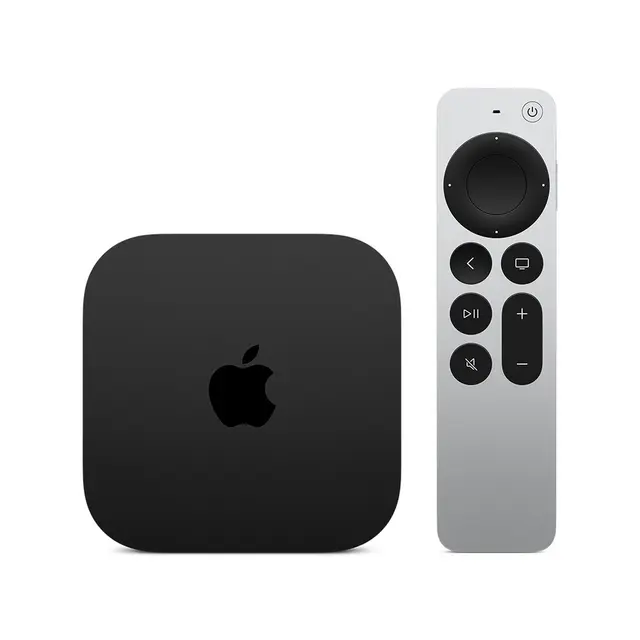
- A dedicated interface and a Siri Remote with USB-C charging
- Gigabit Ethernet and Thread on the 128GB model
Go in knowing
- Streaming subscriptions are separate; the box includes none of them
- The HDMI cable is sold separately
- A responsive smart TV with every app you use may already do this job
Affiliate link. As an Amazon Associate, Tech Standpoint earns from qualifying purchases. It never changes our verdict or score. Disclosure
The specification sheet.
Published specifications from the linked sources. Configurations and availability can differ by country.
- Processor
- A15 Bionic
- Configurations
- 64 GB Wi-Fi; 128 GB Wi-Fi + Ethernet
- Network distinction
- Gigabit Ethernet and Thread on the 128 GB model
- Formats
- Dolby Vision, HDR10+, Dolby Atmos support
- Remote
- Siri Remote with USB-C charging
Buy a better evening, not another box
Apple TV 4K is a streaming player, and its value is whatever it improves over the television's own interface. A household with a responsive smart TV that runs every service it wants has little reason to add a device. A household fighting a sluggish interface, a missing app or wanting tighter Apple integration has a real one. Start from that specific problem. A small box should make watching easier, not become one more component with its own remote, account and update routine.
This covers the A15-based Apple TV 4K family in its 64GB Wi-Fi and 128GB Wi-Fi plus Ethernet configurations. Model identity matters because Apple has used the name across generations. Interface speed, picture output and home-control behaviour have not been tested here. The provisional Standpoint Score assesses the current documented connection and usability proposition; it is not a claim that this player produces a better picture than every television app, or that it stays the newest configuration forever.
The 128GB model is really the Ethernet-and-Thread model
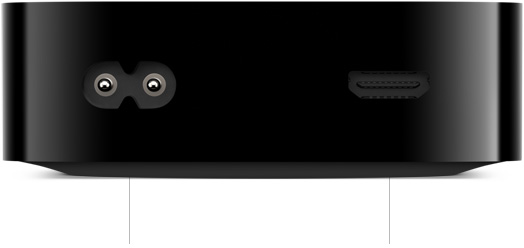
Apple's specification table separates the two configurations by more than storage. The 128GB model includes Gigabit Ethernet and Thread networking; the Wi-Fi model does not. Those are practical reasons to pick one over the other. A television near a wired network outlet benefits from a predictable cable. Anyone interested in the player's home-control role should check the exact model's capabilities rather than assuming the two boxes are functionally identical because they look alike.
Storage should follow actual use. Apps and downloaded game content need capacity in a way ordinary streaming does not, and more storage does not improve a stream. Think about what will actually be installed and kept locally. Weigh the whole household arrangement, including any smart-home role, before paying for the larger configuration. The right upgrade supplies a function you need or simplifies the connection. Buying it because the number is bigger is a weak reason if nothing you run will use the space.
Format support is one link in the chain
Apple documents output support for Dolby Vision, HDR10+ and Dolby Atmos. The source service, the content, the television and the audio equipment all have to support the same arrangement. Check the whole route, especially if a receiver or soundbar sits between the player and the display. A format on the box cannot force an incompatible component to handle it, and it says nothing about the bitrate or mastering quality of what a streaming service sends.
Film, sport and older television material place different demands on frame-rate and dynamic-range handling. The goal is predictable presentation, not a permanently forced setting that makes one demo look impressive. Keep the television's own app available for comparison where you can. This assessment credits the player's documented compatibility; any claim about a visibly better picture belongs to a controlled comparison using the same content on an identified signal path, which has not been done here.
The Siri Remote has to suit the whole household
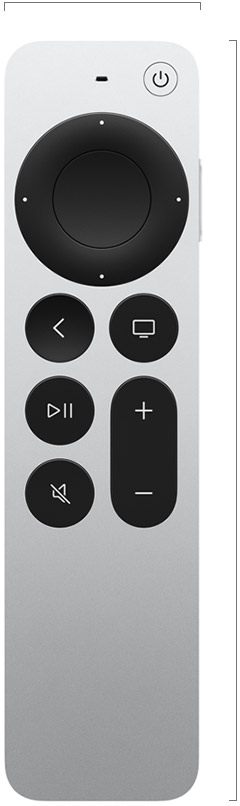
Apple's remote uses a touch-enabled clickpad, dedicated playback controls and USB-C charging. Its value lies in how easily a person can navigate, change volume and recover from an accidental swipe. Try the control style if you can, particularly if someone at home prefers plain directional buttons. A small remote is pleasant to use and easy to lose. Decide where it will live and how it will be charged before it disappears down the sofa.
Apple documents television and receiver control through infrared or HDMI CEC, with conditions. Check your actual equipment rather than assuming one remote handles everything; CEC behaviour depends on settings across several devices. The real test is turning everything on from fully powered down, landing on the right input and adjusting volume. A smooth navigation demo does not prove the evening routine is simple. The outcome that matters is a household member starting a programme without working out which box and remote currently own the screen.
Apps, accounts and subscriptions are all extra
Verify every important streaming service in your local market before buying. Canadian and US catalogues, rights and apps differ. Owning the player includes no subscriptions to the services it displays. Separate promotions and introductory entitlements from recurring charges. Keep a list of what the household actually pays for and compare it with what gets watched, so the device's broad app selection does not quietly become an unplanned pile of subscriptions.
Account setup shapes usability too. Think about profiles, purchase permissions and how another person signs in without taking over someone else's viewing history. A child using the television should have an arrangement that matches the household's expectations, not unrestricted access inherited from the installation account. Those workflows and their current controls have not been checked on a working unit here. A capable platform can still need deliberate configuration, and a familiar ecosystem does not mean its defaults suit everyone who uses the screen.
Apple integration is a list of functions, not a feeling
An Apple household may value how the player works with its phones and services. Assess that as a set of exact functions, not a vague promise that everything just works. Check the current requirements for each feature you want, and consider whoever at home uses another platform; the decision should make sense to them too. Good integration cuts recurring effort without forcing every household member to change devices or accounts.
Read the smart-home role especially carefully. Thread, Matter, account requirements and home-hub functions are related ideas, not interchangeable ones. Verify Apple's current guidance for your accessories and the model you are buying. Remote control, recovery after a network restart and operation by another authorised person are the things that define reliability, and none of them has been tested here. A supported networking technology is not a promise that every accessory can be controlled the way you want, locally or remotely, without extra setup.
A small install still has dependencies
Apple lists the HDMI cable as a separate purchase. Choose one suited to the intended output and keep the player somewhere you can reach it. It should fit the furniture without straining connectors or making the remote arrangement awkward. The built-in power supply means no external brick, but the socket position and cable route still need planning. A small player can disappear visually and remain annoyingly hard to reach when something needs fixing.
Check network behaviour with the television in its real position. A strong connection at a laptop on a nearby desk does not mean the same behind a large screen or inside a cabinet. Watch a few ordinary sessions before buying extra networking gear, and compare wired and wireless where the model allows. The provisional ownership score reflects a documented setup with few components; it does not claim a trouble-free network or assign reliability because the box is small.
Who should buy it
Apple TV 4K makes the strongest case for a household that can name the interface, service or integration problem it fixes. The Ethernet and Thread configuration offers meaningful distinctions for buyers who need those functions. It is a weak purchase when the existing television already delivers a comfortable routine and the new player would mostly duplicate it. Compare the current local price, subscriptions and accessories against that specific improvement before ordering.
What would complete this picture is navigation, remote handling, format transitions, network recovery and shared-account use on an identified television and audio system, with software versions and the exact player generation recorded. Until then, the Standpoint Score describes a documented ownership proposition rather than measured speed or picture quality. The promise is a more predictable viewing routine. Whether that is worth paying for depends on the equipment and habits already in the room, not on the number of services pictured on a product page.
The closest alternatives.
| Product | Standpoint Score | Best for | Price |
|---|---|---|---|
| Apple TV 4K (A15)This review | 8.3Research | A household that wants a dedicated viewing interface and specific, verified Apple integrations. | Amazon.ca ↗ |
| LG C5 OLED 65-inch | 8.3Research | A film and gaming household that can plan a suitable room, installation and source equipment. | Amazon.ca ↗ |
| Apple TV 4K (2026) | 8.2Research | New Apple TV buyers in an iPhone household who want the box that should get updates the longest, a Thread and Matter… | Amazon.ca ↗ |
| Samsung S90H OLED | 8.1Research | Bright living rooms and gamers who want a 65-inch OLED around $2,000 that doesn't turn into a mirror every afternoon. | Amazon.ca ↗ |
Compare scores within a category: Tested means our own use, Research means documentation and attributed outside testing. Price links are affiliate links. As an Amazon Associate, Tech Standpoint earns from qualifying purchases. Disclosure
Sources & further reading.
These are the sources behind this research review. Manufacturer claims are not independent performance measurements. Community accounts, when cited, describe individual experiences.
Product software and regional bundles can change. Corrections and editorial disclosures.
Affiliate link. As an Amazon Associate, Tech Standpoint earns from qualifying purchases. It never changes our verdict or score. Disclosure