Not tested. This is a research score for the documented features, compatibility and ownership trade-offs discussed in this review, not a performance measurement.
Features & capability 30%8.8
The CPU, GPU, SSD, disc drive and Quick Resume create a complete current-generation console package.
Compatibility & connectivity 20%8.8
Xbox services, backward compatibility and HDMI 2.1 are useful, while online features and subscriptions remain service-dependent.
Ownership & upkeep 20%8.1
The quiet design and removable storage help, but the proprietary expansion card and large body affect long-term cost.
Setup & everyday use 15%8.4
Setup is direct and the interface is familiar; storage management and TV settings still deserve a deliberate pass.
Documentation & support clarity 15%8.4
Microsoft documents hardware and compatibility well, while individual game modes and service catalogues need current checking.
Compare scores within the same product category. Small decimal differences should not override your needs or the evidence limits.
How the Standpoint Score works
We score five aspects of the documented product on a 0–10 scale, then calculate a weighted total:
- Features & capability30% of the total
- Compatibility & connectivity20% of the total
- Ownership & upkeep20% of the total
- Setup & everyday use15% of the total
- Documentation & support clarity15% of the total
This product’s 8.5/10 is an editorial research assessment. It does not claim measured performance, tested reliability or a verified customer satisfaction rate. Compare it with products in the same category, and read each criterion’s reasoning above.
Read the full rubric and score bands ↗From a tech standpoint.
Buy the disc-equipped Carbon Black model if you own supported physical Xbox games and want console play on the TV. The 2026 per-game Quick Resume toggle removes an old annoyance. Skip it if your games already live on a capable PC or an all-digital Series X does the same job for less, and never treat the Series X name alone as proof of a disc drive or a particular capacity.
Reasons to consider it
- 12-teraflop RDNA 2 GPU and fast custom NVMe storage
- Quick Resume, now with a per-game off switch, plus deep backward compatibility
- Ultra HD Blu-ray drive and a proprietary expansion card slot
Go in knowing
- Big tower, and the expansion cards are not cheap
- 120 Hz only pays off with the right TV, cable and game mode
- Game Pass pricing and catalogue keep changing
Affiliate link. As an Amazon Associate, Tech Standpoint earns from qualifying purchases. It never changes our verdict or score. Disclosure
The specification sheet.
Published specifications from the linked sources. Configurations and availability can differ by country.
- CPU
- 8-core Zen 2; 3.8GHz or 3.6GHz with SMT
- GPU
- Custom RDNA 2; 12 teraflops
- Storage
- 1 TB custom NVMe SSD
- Video
- 4K-oriented play; up to 120fps in supported game modes; HDMI 2.1 output
- Disc drive
- 1TB Carbon Black configuration: UHD Blu-ray; supported physical games
Name the exact model before you recommend the drive
This review covers the disc-equipped 1 TB Carbon Black Series X from 2020. Microsoft now also lists a white all-digital Series X and a 2 TB Galaxy Black disc model, so the name on its own no longer tells you whether there is a drive or how much storage you get. The material here comes from current Microsoft documentation and attributed observations from Ars Technica's original review; those older tests describe the launch hardware, not every later revision.
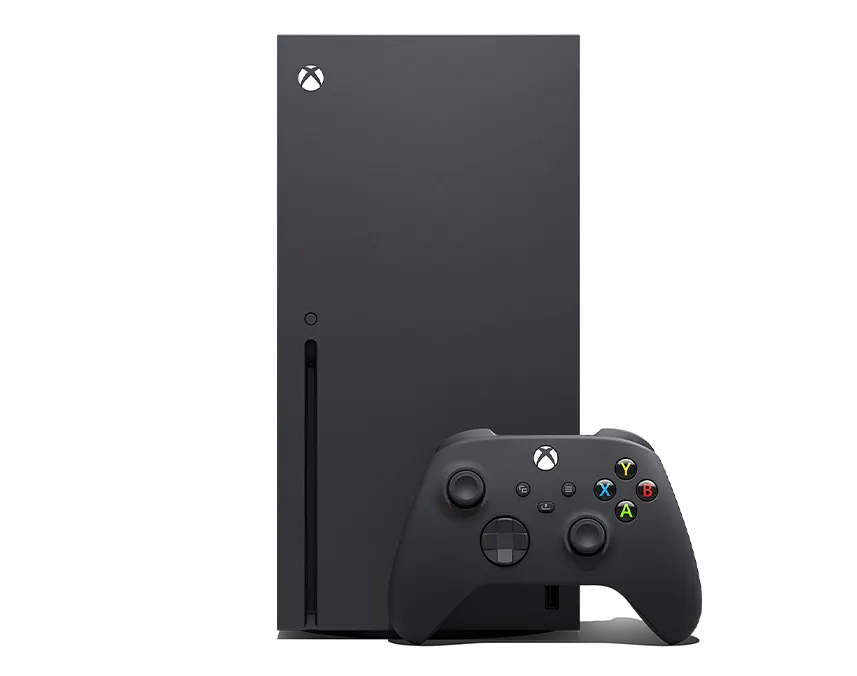
The black tower is roughly 151 × 151 × 301 mm. Place it for access to the disc slot, the rear ports and the cooling openings, not just for how it looks from the sofa. A cabinet that fits the dimensions can still choke airflow. Keep access practical too: if checking a cable means shifting the TV stand, the convenience that makes a console appealing evaporates. Noise and heat in your particular room are things to watch for during the return window.
4K and 120 fps are two capabilities, not one mode
Microsoft specifies an eight-core Zen 2 CPU, a 12-teraflop RDNA 2 GPU and 16 GB of memory. Those numbers describe the box; they cannot tell you which quality mode a given game offers. One title favours resolution, another smoother motion, another ray tracing, and each mode has its own compromises. Look up the actual mode names in the games you care about. An advertised 4K output is not proof of native 4K rendering in every scene.
HDMI 2.1 output can anchor a high-refresh setup, but the whole signal path has to cooperate: the right TV input, a compatible cable and the display's required settings. Routing through a soundbar or receiver adds another device whose supported modes need checking. HDR, variable refresh and a 120 Hz signal are separate features; turning one on does not confirm the others work. A configuration you have verified on your own TV beats buying accessories because they carry a familiar version number.
Quick Resume finally has an off switch
Quick Resume keeps supported games suspended so switching between them skips a full startup. It does not hold a live multiplayer connection. The question that matters is whether resuming drops you into playable action, not whether a frozen frame reappears. A game that reconnects badly may be smoother to launch fresh. Do not expect a fixed number of retained games; it depends on each title's resource footprint.
Microsoft's April 2026 update added the ability to disable Quick Resume for an individual game. Open the title's management options, select Manage game and add-ons, then Quick Resume settings; the same controls are reachable from the Quick Resume group. This changes older advice: you no longer have to live with a title that misbehaves on resume. Turn it off where it causes trouble and keep it everywhere else.
Ars Technica's Sam Machkovech reported roughly 8–12-second returns with older compatible games in his 2020 preview, along with launch-period Quick Resume problems and uncertainty around newer optimized titles. Those findings explain the feature's appeal and early rough edges. They do not show the same faults persist after years of updates, and the current per-game control deserves more weight in a 2026 purchase than a launch complaint without a date.
A compatible disc still starts a download
Microsoft's catalogue distinguishes most Xbox One games from selected Xbox 360 and original Xbox titles. Check the specific game instead of assuming every old disc works. For a supported disc title, inserting the disc kicks off a download, and the disc must stay in the drive to play. The drive is valuable for a physical collection, but it does not make the console a fully offline archive.
Enhancements are per-title as well. FPS Boost, resolution increases and Auto HDR are different features applied unevenly across the catalogue. In his launch review, Machkovech saw Forza Horizon 4 move from its older 30 fps mode to 60 fps; that is one game's historical result, not a promise for every backward-compatible purchase. Microsoft also notes that original Xbox-era online services are gone for those titles. Local multiplayer can survive where supported; an old online mode may not. Buy for the games and modes you can still actually play.
Playable expansion and a USB archive are different jobs
The 1 TB internal SSD is finite, and system overhead means you do not get the full nominal capacity. Microsoft's Storage Expansion Cards match the internal drive's role. USB storage does something narrower: compatible older games can run from it, while most Series X|S-optimized titles must live on the internal SSD or a supported expansion card. Check each title's requirement rather than treating a USB drive as a universal fix.
This is a money question before it is a tidiness question. A household rotating two big games can archive the rest to USB and copy them back. Several people wanting different optimized games ready at once may justify an expansion card, and the card's price should be weighed against a higher-capacity console configuration. Keep room for updates, prune rarely played installs before bulk-downloading a subscription catalogue, and remember that fast loading is worth little when every session begins with a long storage transfer.
A subscription is an option with moving terms
Game Pass makes trying games easy, but its current plans, prices and catalogue set its value. Do not justify a 2026 console with a 2020 subscription price. Check whether the plan you want includes the multiplayer or other services you expect, and remember that catalogue access is not ownership. A game you plan to replay for years deserves its own purchase decision.
The disc model opens another route through used and physical games, but installs, patches and account checks can still require the network. For a cottage or a flaky connection, confirm what launches offline after setup instead of assuming the drive solves every dependency. On a shared console, set purchasing permissions and household profiles deliberately. The account holding the purchases matters when hardware is replaced or access needs restoring; a successful download today is no substitute for keeping the right credentials.
The back panel tells you what the setup can really do
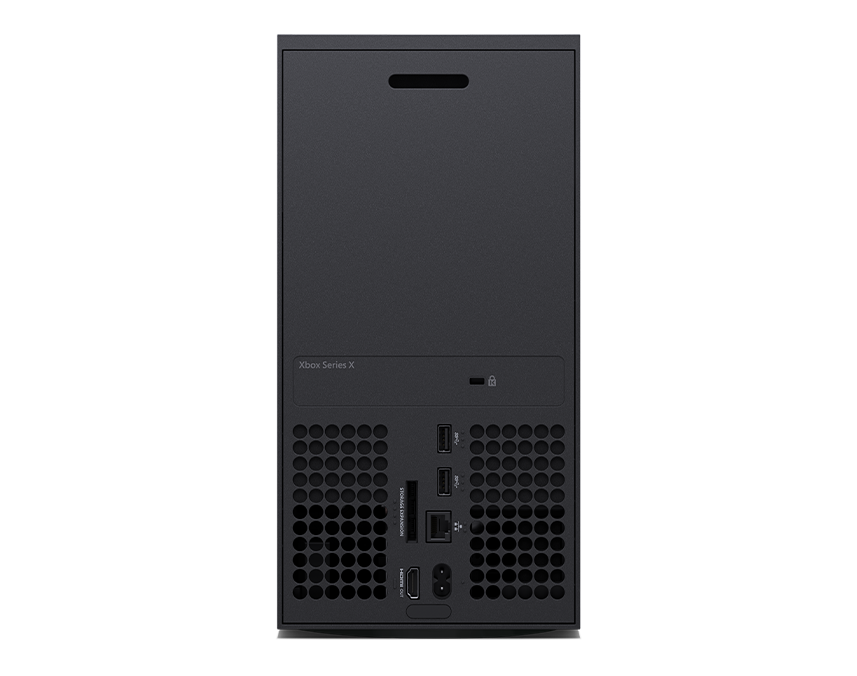
The rear carries HDMI out, three USB 3.1 Gen 1 ports, Gigabit Ethernet and the expansion slot. There is no optical audio out and no HDMI in for an old passthrough arrangement. Owners coming from earlier Xbox hardware should check how existing audio gear connects before the box goes into place. Ethernet removes one wireless variable; the documented Wi-Fi is dual-band 802.11ac, not Wi-Fi 6.
Budget for the people using the console, not just the tower. A second controller, a headset or a charging setup changes the total quickly. Buying used, test controller pairing, disc installation and your intended HDMI mode while you can still return it. Ask exactly which accessories and storage devices are included; a listing photo is not an inventory. A clean-looking bundle with a faulty drive is bad value when discs are the whole reason for this configuration. Judge cosmetic wear and working condition separately.
Care routine, and who this is really for
Microsoft's service guidance says power off and unplug before exterior cleaning. Use a soft lint-free cloth lightly dampened with mild soap and water, or suitable pre-moistened wipes, and never apply liquid directly. It suggests cleaning every three to six months or as needed. Keep it external. The published disassembly guides are not an invitation to open a working console whenever a game misbehaves; check for updates and isolate the actual fault first.
This configuration fits an Xbox household that values supported discs, an existing library and simple TV play. It is a weaker choice when your games already run on a capable PC, or when an all-digital Series X meets the same needs for less. Check current local prices rather than assuming the launch position still holds. Expansion card cost and shifting service terms are genuine parts of ownership, and they belong in the comparison.
The closest alternatives.
| Product | Standpoint Score | Best for | Price |
|---|---|---|---|
| Xbox Series XThis review | 8.5Research | A console player who wants a high-performance Xbox with a disc drive, broad backward compatibility and Game Pass as an… | Amazon.ca ↗ |
| Nintendo Switch 2 | 8.3Research | A Nintendo player or household that genuinely uses both portable sessions and television play. | Amazon.ca ↗ |
| Sony PlayStation 5 Pro | 8.2Research | A PlayStation enthusiast with supported enhanced games and a display setup that can use the improvements. | Amazon.ca ↗ |
| Valve Steam Deck OLED | 8.4Research | A PC gamer who wants a handheld Steam library with console-style suspend and resume and is willing to check Linux… | Amazon.ca ↗ |
Compare scores within a category: Tested means our own use, Research means documentation and attributed outside testing. Price links are affiliate links. As an Amazon Associate, Tech Standpoint earns from qualifying purchases. Disclosure
Sources & further reading.
These are the sources behind this research review. Manufacturer claims are not independent performance measurements. Community accounts, when cited, describe individual experiences.
- Xbox Series X — official product page ↗manufacturer
- Xbox Series X technical specifications ↗manufacturer
- Xbox backward compatibility ↗manufacturer
- Xbox: April 2026 public update and per-game Quick Resume controls ↗support
- Microsoft: Series X service guidance, cleaning and fault checks ↗support
- Ars Technica: Sam Machkovech’s independently conducted 2020 Series X/S review ↗independent review
Product software and regional bundles can change. Corrections and editorial disclosures.
Affiliate link. As an Amazon Associate, Tech Standpoint earns from qualifying purchases. It never changes our verdict or score. Disclosure