Not tested. This is a research score for the documented features, compatibility and ownership trade-offs discussed in this review, not a performance measurement.
Features & capability 30%8.4
25W Qi2.2 plus 45W two-way USB-C, a fan that measurably holds speed, a kickstand and a useful display; Macworld's 199% battery score is near the top of the 10K class.
Compatibility & connectivity 20%6.8
Full 25W speed is limited to iPhone 16 and newer, while Pixel and Galaxy owners lose PixelSnap or need a Qi2 case and the Fold 8 ran at 5 to 8 W at first.
Ownership & upkeep 20%7.2
Two-year warranty and no subscription, but no wall charger, a short cable, C$149.99 pricing, and a fan with no long-term owner history yet.
Setup & everyday use 15%8.2
Magnetic snap-on use, a clear percentage screen, Cool and Silent modes and a stand make daily use simple, though it is thick and heavy at 220 g.
Documentation & support clarity 15%7.4
Anker's support pages are frank about real capacity and noise, but Canadian return terms and flight certification are not stated on the pages that were readable.
Compare scores within the same product category. Small decimal differences should not override your needs or the evidence limits.
How the Standpoint Score works
We score five aspects of the documented product on a 0–10 scale, then calculate a weighted total:
- Features & capability30% of the total
- Compatibility & connectivity20% of the total
- Ownership & upkeep20% of the total
- Setup & everyday use15% of the total
- Documentation & support clarity15% of the total
This product’s 7.7/10 is an editorial research assessment. It does not claim measured performance, tested reliability or a verified customer satisfaction rate. Compare it with products in the same category, and read each criterion’s reasoning above.
Read the full rubric and score bands ↗From a tech standpoint.
Buy the MagGo Power Bank 2 Pro if you carry an iPhone 16 or newer and you've been annoyed by magnetic batteries that slow to a crawl once they warm up. Android Authority and Macworld both found the fan keeps 25W charging going, Macworld's battery test put it near the top of the 10K class, and the 45W USB-C port is a real bonus. Skip it if you're on an older iPhone, a Pixel or a Galaxy, because the headline speed mostly isn't available to you, or if you only want emergency juice, since a C$99.99 slimmer Anker model does that job for C$50 less. This is a research review built from Anker's documentation and outside testing. Cameron hasn't used one.
Reasons to consider it
- The fan does what Anker says: Android Authority timed an iPhone 18 Pro Max at 80% in one hour with the fan on, against a 3 hour 40 minute full charge with it off, and Macworld got an iPhone 16 Pro to 50% in about 30 minutes
- Macworld's battery test scored it 199% against a 174% average for 10K banks, so a bigger share of the rated capacity actually reaches the phone than on most rivals
- The 45W USB-C port works both ways, so the bank recharges 0 to 100% in about 1 hour 10 minutes in Android Authority's test and can add roughly half a charge to a 14-inch MacBook Pro in about 40 minutes
- The kickstand and the percentage display are daily-use features: Macworld and Applesfera both praise the stand for video calls and StandBy mode, and the screen shows exact power and temperature instead of four vague LEDs
Go in knowing
- It's iPhone-first: Android Authority says Pixel owners miss PixelSnap behaviour and Samsung owners need a Qi2 case, and its Galaxy Z Fold 8 ran at 5 to 8 W before settling, so Android users pay for speed they mostly don't get
- At C$149.99 it costs C$50 more than Anker's own slim 10K MagGo at C$99.99, and reviewers at Macworld, Applesfera and Smartworld all call it thick and heavy at 17.8 mm and 220 g
- The fan is audible: Anker rates it under 50 dB at 5 cm and Smartworld says it's heard only in a silent room, but Silent Mode switches the fan off, and Android Authority's fan-off results show charging slowing a lot once heat builds
- Anker's own support page says 35 to 45% of the battery's energy is lost in conversion, so 10,000mAh gives about 5,500 to 6,500mAh of usable output, and there's no wall charger or built-in cable
Affiliate link. As an Amazon Associate, Tech Standpoint earns from qualifying purchases. It never changes our verdict or score. Disclosure
The specification sheet.
Published specifications from the linked sources. Configurations and availability can differ by country.
- Canadian price (Oct 31, 2026)
- C$149.99 at Anker Canada (anker.com/ca, buyable; Phantom Gray and Polar Night Blue on pre-order, expected to ship Nov 15) and C$149.99 on Anker's other Canadian store page, which showed all four colours sold out. Amazon.ca could not be checked
- US and other prices
- US$109.99 at launch, GBP 99.99 in the UK, EUR 109.99 in Germany; a Prime Big Deal Days sale took the US price to US$87.99, per Notebookcheck
- Battery
- 10,000mAh, 39.2Wh per Macworld
- Wireless output
- Qi2.2, up to 25W; full speed needs iPhone 16 or newer per Macworld and Smartworld
- USB-C port
- Up to 45W in and out; Anker says 0 to 80% in about 52 minutes on a 45W source; the wired and wireless outputs share power
- Cooling
- SnapCool fan with dual air channels and 3-layer graphene; Cool and Silent modes; Anker says surface temperature stays under 36 degrees C and noise stays under 50 dB at 5 cm on full fan
- Size and weight
- 70.9 x 105.15 x 17.8 mm, 220 g (7.76 oz)
- Stand and display
- Built-in kickstand adjustable 0 to 80 degrees; colour display with six screens for power, battery level, battery health and temperature
- In the box
- Power bank, 0.3 m (1 ft) USB-C to USB-C cable, storage pouch, welcome guide; no wall charger
- Warranty
- 24 months, per Anker's Canadian product page
A C$149.99 power bank with a fan, and it only really pays off on a new iPhone
The most useful fact about the Anker MagGo Power Bank 2 Pro fits in one number from Android Authority. With its fan running, an iPhone 18 Pro Max went from empty to 80% in an hour. With the fan off, the same phone needed 3 hours 40 minutes to fill up. That gap is the whole point of this product. Magnetic power banks get warm, the phone throttles the charge, and the fast number on the box stops meaning anything. Anker put a fan in to stop that.
On Anker Canada's store the MagGo 2 Pro is C$149.99 for the 10,000mAh model (A110R). The US launch price is US$109.99, and in Canada the bank sits C$50 above the C$99.99 slim Anker 10K on the same store. Anker's page also showed some colours on pre-order for November 15 and the second Canadian store page listed every colour as sold out, so stock isn't deep yet.
This is a research review. Cameron hasn't used a MagGo 2 Pro, so everything below comes from Anker's own pages and support articles plus outside reviews from Android Authority, Macworld, Applesfera and Smartworld. The question it answers is simple: is a fan worth C$50 over Anker's cheaper option, and are you carrying the right phone to benefit?
What Anker changed from the 15W MagGo, and who can happily skip the upgrade
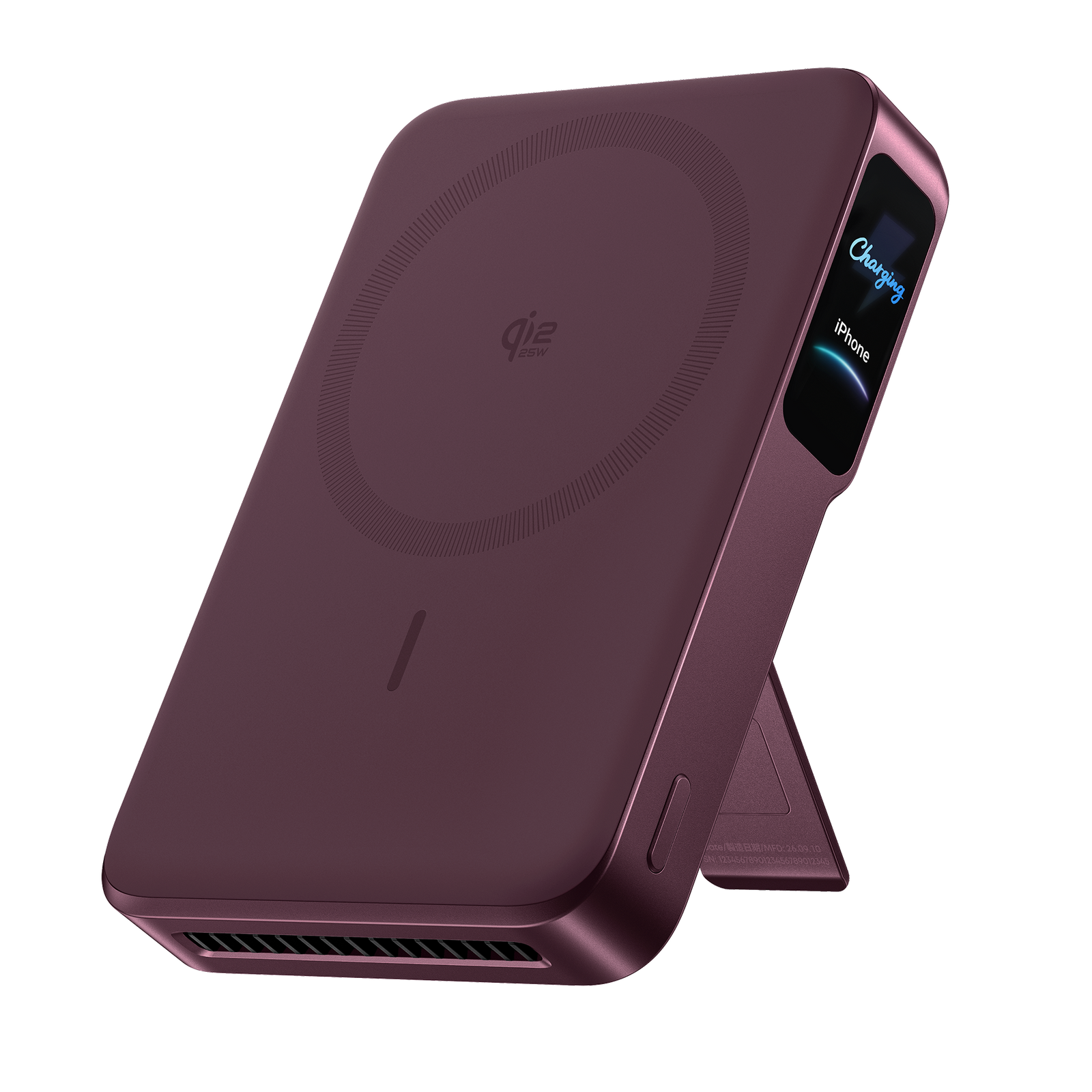
Applesfera lists the jumps versus the previous generation. Wireless output goes from 15W to 25W on Qi2.2, the USB-C port from 27W to 45W (Notebookcheck's figure for the older model), and the weight drops by 30 g to 220 g despite adding a fan. New is the colour screen, the 0 to 80 degree kickstand and two fan modes, Cool and Silent. It is 17.8 mm thick, and Macworld calls it chunkier than some rivals.
Macworld puts a number on what that means in daily use. The old Anker 15W MagGo 10K scored 170% in its battery test and took about 15 minutes longer to get a phone to 50%. The 2 Pro scored 199%, about 17% better, and reached 50% on an iPhone 16 Pro in roughly 30 minutes. Macworld's comparison point is a typical 15W wireless charger, which needs about 45 minutes for the same job.
So who shouldn't upgrade? Anyone happy with the old MagGo 10K, anyone on an iPhone 15 or older, and anyone who mostly leaves a battery in a bag for emergencies. Smartworld says iPhone 15 Pro and older phones are capped at 15W wireless, which is exactly what the old model already did. In that case the C$129.99 original or the C$99.99 slim version does the same job for less.
The fan test: 80% in an hour with it on, nearly four hours with it off
Android Authority ran the cleanest comparison. On an iPhone 18 Pro Max with the fan on, charge reached 25% in 15 minutes, 80% in an hour and 100% in 1 hour 40 minutes. With the fan off the phone took 3 hours 40 minutes to reach full. The reviewer also noted the fan holds temperatures around 36 degrees C, matching what Anker claims. Macworld saw the same pattern on an iPhone 16 Pro: about 30 minutes to 50% in Cool mode and 33 minutes in Silent mode.
Those two reviews don't quite agree on how much Silent mode costs. Macworld's three-minute gap is small, but that was a 0 to 50% sprint where the bank hadn't heated up yet. Android Authority's full charge shows the penalty grows once heat builds. For a long session, like charging through a dinner or a long train ride, expect Silent to behave more like the older 15W banks.
Anker's own claim is 25% in 10 minutes and 50% in 25 minutes on an iPhone 17 Pro. Applesfera says its own run came in closer to 30 minutes for 50%, which is a fair real-world gap from a lab claim. My read: treat 30 minutes to half a charge as the realistic target on a recent iPhone, and treat the fan as the thing that earns the C$50 premium.
10,000mAh on the box, roughly 6,000mAh in your phone: what Macworld and Anker both say
Every power bank is rated by the cell inside it, not what comes out. Anker says so directly in a support article about this exact model. It states that about 35 to 45% of the battery's energy can be lost to the cells and the conversion circuitry, and that a full A110R delivers about 5,500 to 6,500mAh of usable capacity. That's normal for the category, but it's unusual to see the maker print it.
Macworld's battery test helps put that in context. The MagGo 2 Pro delivered 199% of a phone battery in total, against a 174% average across the 10K banks it has tested and a best of 207% from the Ugreen MagFlow Pro. Its 39.2Wh rating is also above the 38.2Wh average. So it's better than most at the job, a little behind the best.
In real life Applesfera puts it at nearly one full charge of an iPhone 18 Pro Max plus an estimated 10 to 30% more, not the multiple refills the 10,000 figure suggests. A commuter on the GO train who tops up once a day will never run it dry. A weekend trip with a phone, a watch and a pair of earbuds is where you start doing sums.
Android owners get the fan and the stand, but not the speed
Android Authority is blunt that this is a better bank for an iPhone. In its Galaxy Z Fold 8 test with the fan on, the phone reached 21% in 15 minutes, 50% in an hour and took about two and a half hours to fill, and it first bounced between 5W and 8W before settling at full power. With the fan off it needed just over three hours. That's decent, but nothing like the iPhone's run.
The reasons are mostly about standards, not Anker. Android Authority says Pixel phones lose PixelSnap behaviour and Samsung phones only get proper Qi2 support when they're wearing a compatible case. Smartworld agrees, saying Android phones get slower wireless charging even with a magnetic case. If you own a Galaxy S-series with a Qi2 case, expect a mid-speed result.
The sensible workaround is the cable. The 45W USB-C port will charge most Android phones at their own wired speed, though the included cable is only 30 cm, so you'll want a longer one. At that point you've paid C$149.99 for a good 45W power bank with a nice screen. It works, but a cheaper non-wireless bank would do the same.
It can charge a laptop, but only a thin one, and never alongside wireless
The 45W USB-C port is the second reason to look at this model. Android Authority plugged a 14-inch M1 Pro MacBook Pro into it and got from empty to 49% in a bit over 40 minutes, with the power bank drained to nothing by the end. A Razer Blade 14 gained 47% in 50 minutes and also emptied the bank. Those are real numbers for a 10K bank: it's a decent half-charge for a laptop that sips power, and it's no substitute for a proper 20,000mAh brick.
Applesfera adds a limit that the box doesn't make obvious. The wired and wireless outputs share power, so you can't run the full 45W on the cable and 25W on the pad together. Charge a phone wirelessly while topping up a tablet and each will get less than its maximum.
The cable also does double duty on the way in. Android Authority timed 0 to 100% in 1 hour 10 minutes with the fan on, and 1 hour 30 minutes with it off, using a 45W source. You'll need your own charger for that, as none ships in the box. Anker sells a bundle with a Nano 45W charger for C$199.98 on its Canadian store if you want both.
Carrying it every day: noise, bulk and the screen that actually helps
At 220 g and 17.8 mm it's a lot of phone to hold. Smartworld says it isn't meant to stay stuck to the phone all day, and Macworld calls it chunkier than some rivals. Applesfera makes a fair point that it's 30 g lighter than the previous generation, so the weight is going down, just not enough to make a slim bank obsolete. Think bag or jacket pocket rather than clipped to the back of the phone.
The fan noise gets very different descriptions. Applesfera calls it surprisingly quiet and Smartworld says you only hear it in a silent room. Anker says the fan measures under 50 dB at 5 cm on maximum, and suggests Silent mode if it bothers you, though coil whine from wireless charging is described by Anker as normal. A bedside charger is the place you'd notice it, which is why Silent mode exists.
The screen is the small feature that earns its keep. Instead of four dots, it shows exact percentage, charging power, battery health and temperature across six screens, and a button lets you switch the fan mode or turn wireless off. Macworld and Android Authority both single the display out as a plus. Combined with the stand, it turns into a small desk dock that props the phone at up to 80 degrees.
Anker's cheaper banks, the UGREEN MagFlow Pro and Apple's pack: where C$149.99 lands
Inside Anker's Canadian lineup the pricing is plain. The MagGo 10K Slim is C$99.99, the original MagGo 10K (A1654) is C$129.99, and a 10K model for the Apple Watch is C$119.99. The Nano 5K starts at C$69.99. The Pro is the only one with the fan and the 25W Qi2.2 pad. If you charge in short bursts, a slim model is the better value. If you play long video calls on battery, the fan matters.
The closest outside rival is the UGREEN MagFlow Pro, which uses liquid cooling. Macworld measured a higher battery score for it (207% versus 199%) along with a built-in cable, but it's heavier at 235 g, has no kickstand and a louder fan. Android Authority lists it as slightly pricier than the Anker's US price. I couldn't confirm a current Canadian price for it, so check before you commit.
Macworld also names the Kuxiu S4, the thinnest 10K bank at 13.7 mm with a kickstand, and the Baseus PicoGo AM52, which also does 45W USB-C. Apple's own MagSafe battery pack is the other name people will ask about. Searches found no current Canadian price I could verify, so I can't say where it sits against this bank.
Living with it: a 24-month warranty, a short cable and who pays for the charger
Anker Canada lists a 24-month warranty on the product page, which is longer than the 12 months many phone accessories get. The page also mentions a 30-day money-back guarantee and links to Amazon.ca for a Black Friday saving of C$20, but the Canadian pages I could read gave no return terms for the power bank itself. Check the checkout page before you buy, and keep your receipt.
Running costs are zero. There's no app, no subscription and no firmware you must keep updated. What you will spend on are extras. The box has a 30 cm USB-C cable and a storage pouch, no wall plug, and no longer cable. Several reviewers flag the short cable and the missing charger, and a 45W USB-C charger is what you need to get the quick 0 to 80% in 52 minutes Anker advertises.
Long-term, the open question is the fan. It's a moving part inside a sealed battery, and this model only launched this fall, so there's no multi-year owner history. Anker publishes a noise and fan-logic support article, which at least shows the company expects questions. Reddit owner threads weren't reachable for this review, so owner reliability reports are missing here.
Who should buy the MagGo Power Bank 2 Pro, who should skip it, and what to buy instead
Buy it if you have an iPhone 16, 17 or 18 and you charge on the move or at a desk. The fan keeps the speed up, the stand and screen are useful every day, and the 45W port lets one bank cover a phone and a thin laptop. Android Authority and Macworld both call it one of the most capable magnetic banks in its size class, and Applesfera recommends it to anyone with a compatible iPhone who wants a high-end battery.
Skip it if you're on Android, an iPhone 15 or older, or you need a bank mostly for emergencies. Android Authority describes it as an acceptable companion at best for Galaxy and Pixel phones. In that case Anker's C$99.99 MagGo 10K Slim is the smarter pick, or a plain USB-C bank if you don't care about wireless.
If you want the best battery score, look at the UGREEN MagFlow Pro, once you've checked its Canadian price. If you want to save, wait: Anker's page already advertises a Black Friday saving, and the US price fell to US$87.99 during a Prime sale. A C$149.99 bank that drops by C$20 to C$30 becomes much easier to recommend.
The closest alternatives.
| Product | Standpoint Score | Best for | Price |
|---|---|---|---|
| Anker MagGo Power Bank 2 ProThis review | 7.7Research | iPhone 16, 17 or 18 owners who want one magnetic battery that charges fast, doubles as a desk stand, and can also top up… | Amazon.ca ↗ |
| Apple iPhone 18 Pro | 8.3Research | An iPhone creator who will actually use aperture, shutter and white-balance controls and has a plan for storage and… | Amazon.ca ↗ |
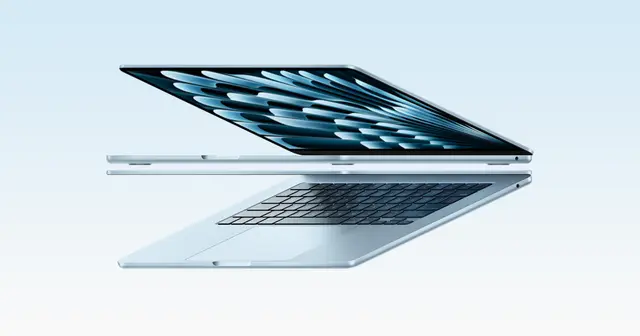
| Apple MacBook Air 13-inch (M5) | 8.4Research | A mobile writer, student or mixed-workload Mac user who values portability and can plan the configuration up front. | Amazon.ca ↗ |
| Apple iPad Air (M4) | 8.1Research | Someone who needs a tablet for drawing, documents and travel, not someone assuming every laptop task will transfer. | Amazon.ca ↗ |
Compare scores within a category: Tested means our own use, Research means documentation and attributed outside testing. Price links are affiliate links. As an Amazon Associate, Tech Standpoint earns from qualifying purchases. Disclosure
Questions before checkout.
How much is the Anker MagGo Power Bank 2 Pro in Canada?
Anker's Canadian store lists it at C$149.99 for the 10,000mAh model. On October 31, 2026 the main Anker Canada page was taking orders, with two colours on pre-order for November 15, while a second Anker Canada store page showed all colours sold out. Amazon.ca could not be checked, and US pricing is US$109.99.
Does the MagGo 2 Pro charge Samsung or Pixel phones at 25W?
No, not in practice. Android Authority says Pixel owners miss PixelSnap behaviour and Samsung phones need a compatible Qi2 case. Its Galaxy Z Fold 8 started at only 5 to 8 W before reaching full power and took about 2.5 hours to fill. Full 25W speed needs an iPhone 16 or newer.
How loud is the fan on the Anker MagGo Power Bank 2 Pro?
Anker rates it under 50 dB measured 5 cm away at full speed. Applesfera calls it surprisingly quiet and Smartworld says it is audible only in a silent room. If it still bothers you, Silent Mode turns the fan off, though charging then slows noticeably once the bank warms up, as Android Authority's fan-off results show.
Can the MagGo 2 Pro charge a laptop?
Yes, with limits. Its 45W USB-C port took a 14-inch M1 Pro MacBook Pro from empty to 49% in a bit over 40 minutes in Android Authority's test, and a Razer Blade 14 gained 47% in 50 minutes. Both drained the bank to zero, so it is a top-up for a thin laptop, not a full replacement.
Is the MagGo Power Bank 2 Pro allowed on a plane?
Android Authority says it is certified flight-safe, and at 39.2Wh per Macworld it sits well under the common 100Wh carry-on limit. Power banks must go in your carry-on bag, never checked luggage. Anker's product page did not mention flight certification, so check your airline's rules before you fly.
How long does the MagGo 2 Pro take to recharge itself?
Anker claims 0 to 80% in about 52 minutes from a 45W source. Android Authority measured 0 to 100% in 1 hour 10 minutes with the fan on and 1 hour 30 minutes with it off. You need your own 45W USB-C charger, since the box has only a short cable and no wall plug.
Sources & further reading.
These are the sources behind this research review. Manufacturer claims are not independent performance measurements. Community accounts, when cited, describe individual experiences.
- Anker Canada: MagGo 2 Pro Magnetic Power Bank (10K, Qi2 25W, Active Cooling) product page ↗manufacturer
- Anker Canada store: MagGo 2 Pro product page (specs, in-box items, price) ↗manufacturer
- Anker Canada store: MagSafe Battery Packs collection (CAD prices for the MagGo range) ↗manufacturer
- Anker UK: MagGo Power Bank 2 Pro (A110R) specifications ↗manufacturer
- Anker support: MagGo Power Bank 2 Pro output capacity is lower than expected ↗manufacturer support
- Anker support: MagGo Power Bank 2 Pro noise issues ↗manufacturer support
- Android Authority: Anker MagGo Power Bank 2 Pro review ↗independent review
- Macworld: Anker MagGo Power Bank 2 Pro review, fast 25W charging with active cooling ↗independent review
- Applesfera: Anker MagGo Power Bank 2 Pro analysis (Spanish) ↗independent review
- Smartworld: Anker MagGo Power Bank 2 Pro review (Italian) ↗independent review
- Notebookcheck: Anker's new Qi2 power bank drops to lowest price on Amazon ↗news report
Product software and regional bundles can change. Corrections and editorial disclosures.
Affiliate link. As an Amazon Associate, Tech Standpoint earns from qualifying purchases. It never changes our verdict or score. Disclosure