Not tested. This is a research score for the documented features, compatibility and ownership trade-offs discussed in this review, not a performance measurement.
Features & capability 30%8.9
The 12-core M6 nearly matches the M4 Pro in Tom's Hardware's multi-core and HandBrake tests and beats it in single-core.
Compatibility & connectivity 20%8.2
Wi-Fi 7, 2.5Gb Ethernet, HDMI and three external displays are strong, but ports are Thunderbolt 4 only and there's no USB-A or SD slot.
Ownership & upkeep 20%7.3
Soldered storage, steep Canadian upgrade prices and a one-year warranty make the day-one configuration permanent and costly.
Setup & everyday use 15%8.7
Small, quiet and simple to place behind a monitor; only the underside power button and adapters for older USB-A gear add friction.
Documentation & support clarity 15%8.6
Apple's Canadian spec and store pages clearly list each chip, memory bandwidth and display limit, though the bandwidth split is easy to miss.
Compare scores within the same product category. Small decimal differences should not override your needs or the evidence limits.
How the Standpoint Score works
We score five aspects of the documented product on a 0–10 scale, then calculate a weighted total:
- Features & capability30% of the total
- Compatibility & connectivity20% of the total
- Ownership & upkeep20% of the total
- Setup & everyday use15% of the total
- Documentation & support clarity15% of the total
This product’s 8.4/10 is an editorial research assessment. It does not claim measured performance, tested reliability or a verified customer satisfaction rate. Compare it with products in the same category, and read each criterion’s reasoning above.
Read the full rubric and score bands ↗From a tech standpoint.
The M6 Mac mini is a big jump over the M4 in speed, with the base chip landing close to last year's M4 Pro in reviewers' tests, and it stays quiet while doing it. The catch is money: $1,249 in Canada for 16GB and 256GB, plus storage that's soldered down again so you can't fix a small drive later. Skip the base model and buy the 16GB/512GB at $1,549, or the 24GB/512GB at $1,849 if you want to run local AI. If you only browse, stream and do email, a discounted M4 or a cheaper Windows mini PC is the better use of your money.
Reasons to consider it
- Real speed for the size: Tom's Hardware measured single-core scores 21% above the M4 Pro Mac mini and a HandBrake export one second faster than that M4 Pro.
- Quiet under load: Tom's Hardware logged the fan at roughly 2,615 rpm through ten Cinebench runs, and Engadget never heard it ramp up the way the M4 Pro did.
- Twice the storage speed of the M4: 9to5Mac's 512GB unit hit about 6,000 to 6,400 MB/s, roughly double the 512GB M4.
- Better networking out of the box: 2.5Gb Ethernet, Wi-Fi 7 and Bluetooth 6 are standard, which helps if you move big files to a NAS.
Go in knowing
- The base price jumped: $1,249 in Canada versus $799 when the M4 model launched, for the same 16GB and 256GB.
- Storage is soldered again, so the cheap DIY SSD upgrades M4 owners used are gone. Buy the capacity you need on day one.
- The M6 model gets Thunderbolt 4, not Thunderbolt 5. You need the $2,399 M5 Pro model for 120Gb/s ports and Mac clustering.
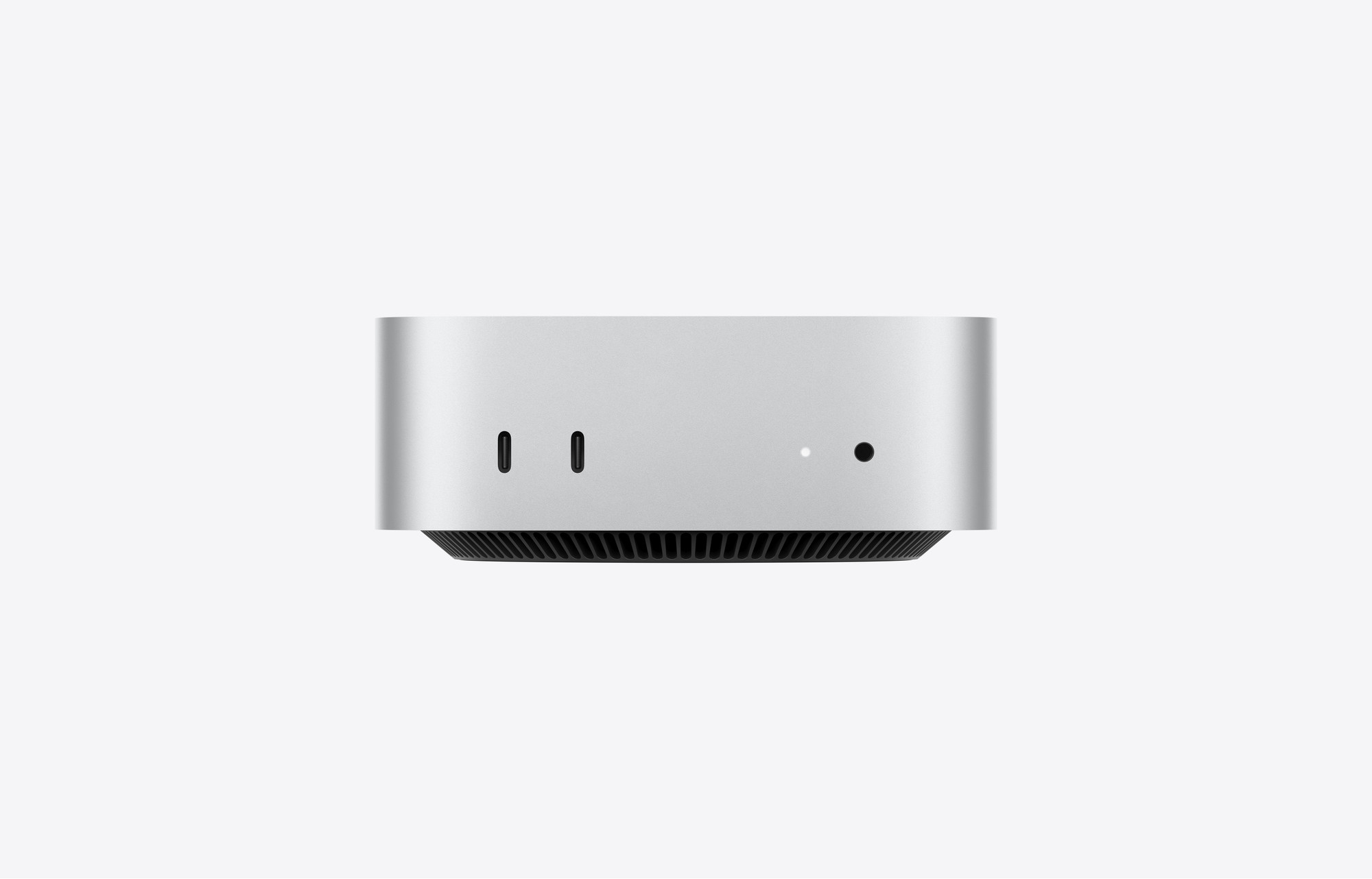
- Still no USB-A, no SD card slot, and the power button sits underneath the case.
Affiliate link. As an Amazon Associate, Tech Standpoint earns from qualifying purchases. It never changes our verdict or score. Disclosure
The specification sheet.
Published specifications from the linked sources. Configurations and availability can differ by country.
- Canadian price (Oct 13, 2026)
- $1,249 (16GB/256GB), $1,549 (16GB/512GB), $1,849 (24GB/512GB) at apple.com/ca; Best Buy Canada $1,249.99 / $1,549.99 / $1,849.99; Costco.ca $1,239.99 and Amazon.ca $1,249 for the base model
- Chip
- Apple M6: 12-core CPU (2 super, 4 performance, 6 efficiency cores), 12-core GPU, dual 16-core Neural Engine
- Memory
- 16GB unified memory (153GB/s); 24GB (+$300) or 32GB (+$600) at 170GB/s; not upgradable later
- Storage
- 256GB, 512GB, 1TB or 2TB SSD, soldered to the logic board
- Ports
- Front: 2 USB-C (10Gb/s), headphone jack. Back: 3 Thunderbolt 4 (40Gb/s), HDMI, 2.5Gb Ethernet (10Gb optional)
- Displays
- Up to three external displays
- Wireless
- Apple N1 chip: Wi-Fi 7, Bluetooth 6, Thread
- Size and weight
- 5.0 x 12.7 x 12.7 cm, 0.67 kg; 155W internal power supply
- Warranty and returns
- One-year limited warranty; Apple Canada return window of about two weeks (check terms at checkout)
The same 16GB and 256GB now costs $450 more in Canada
When Apple launched the M4 Mac mini in 2024, the base model was $799 in Canada. The new M6 version, with the same 16GB of memory and the same 256GB drive, is $1,249 at apple.com/ca. That's a $450 jump for a computer that looks identical from the outside. In the US the story is the same in smaller numbers: Ars Technica, The Verge and Tom's Hardware all point out it went from US$599 to US$899.
Here's the thing though. Almost every outlet still loves it. The Verge gave it 9 out of 10 and called it the best tiny computer you can buy. Engadget gave it 8.7. Tom's Hardware and Ars Technica both praised the speed and both said the value story took a hit. The reviewers point to the same culprit: memory and storage chips got far more expensive in 2026 because AI data centres are buying everything.
So this review answers one question. At $1,249 and up, is the M6 Mac mini still the smart Mac desktop to buy in Canada, and which configuration actually makes sense? Short answer: yes for most people who need a Mac desktop, but not the base model, and not if a cheaper machine already does your job. Start with what Apple actually changed.
A new chip inside, and one thing Apple quietly took back
The M6 is Apple's first 2-nanometre chip and the Mac mini got it first. It has 12 CPU cores instead of 10, split into two very fast "super" cores, four performance cores and six efficiency cores. The GPU goes from 10 to 12 cores, and Ars Technica notes it's the first GPU core bump on Apple's entry chip since the M2. Apple's N1 wireless chip adds Wi-Fi 7 and Bluetooth 6, and wired Ethernet goes from 1Gb to 2.5Gb as standard.
One detail hides in the memory table. Ars Technica points out the 16GB model runs at 153GB/s of memory bandwidth, while the 24GB and 32GB versions run at 170GB/s, about 11% more. That's a small bump for graphics and local AI, but it's one more nudge toward the pricier configs.
The thing Apple took back is storage you can upgrade. The M4 Mac mini had its SSD on a removable module, and owners bought cheap third-party upgrade kits. Appleosophy reported, citing a teardown by upgrade-kit seller Expand Mac mini, that the M6 and M5 Pro models have their storage chips soldered to the board again. It's one of the most-discussed complaints in r/macmini and r/mac, where several owners said it's the reason they're keeping their M4.
Who shouldn't upgrade? If you own an M4 Mac mini that does what you need, nothing here is urgent. If you're on an Intel Mac mini or an M1 with 8GB, the jump is huge. How huge depends on the work you do.
The base chip nearly matches last year's $1,899 M4 Pro
Apple claims the M6 is 40% faster than the M4 on the CPU and up to twice as fast on graphics. The reviews mostly back that up, and in places beat it. 9to5Mac's Geekbench 7 run showed the M6 about 24% ahead of the M4 in single-core, 48% in multi-core and 71% on the GPU. Ars Technica saw 20 to 30% single-core gains and 50 to 80% gains in multi-core and graphics across its tests.
The more interesting comparison is the M4 Pro, which cost $1,899 in Canada at launch. Tom's Hardware found the M6 21% faster in single-core and only slightly behind in multi-core: 21,045 against 22,661, even though the M4 Pro has 16 CPU cores to the M6's 12. In its HandBrake test, turning a 4K video into 1080p, the M6 finished in 2 minutes 46 seconds, one second faster than the M4 Pro and nearly two minutes faster than the M4. Engadget saw a similar picture: 16.5% faster single-threaded than the M4 Pro, with the older Pro chip keeping a small multi-core edge.
Not everyone is dazzled. Six Colors measured the M6 about 11% faster than last year's M5 in single-core, 23% in multi-core and 24% on graphics, and called it an average step rather than a leap. Fair enough. But nobody buying a Mac mini today is choosing between an M5 and an M6 desktop, since the Mac mini skipped the base M5 chip.
What this means day to day: if you edit photos in Lightroom, cut family videos or run a dozen browser tabs while on a Teams call, the base chip has more headroom than most people will use. You'd only reach for the M5 Pro for heavy, sustained work. The bigger decision is memory and storage.
The 256GB drive is the real trap, and fixing it costs $300
Ars Technica, 9to5Mac and Tom's Hardware all land on the same complaint: 256GB is too small for a $1,249 computer. macOS, a photo library and a couple of games will eat it fast. On the M4 you could fix that later with a third-party module. On the M6 you can't, so the drive you pick at checkout is the drive you keep.
Apple.ca charges $300 to go from 256GB to 512GB, which is why the 16GB/512GB model is $1,549. Going to 1TB adds another $450 on top of that, and 2TB adds $1,200 over the 512GB model. Memory works the same way: $300 for 24GB and $600 for 32GB. A 24GB/512GB machine is $1,849 at Apple and Best Buy Canada.
There's a speed angle too. 9to5Mac measured roughly 6,000 to 6,400 MB/s from its 512GB M6, about twice the 512GB M4. Appleosophy also passed on a Max Tech report that the 256GB model uses a single storage chip. On older Macs, single-chip base drives tested slower, but none of the reviews cited here measured the 256GB M6, so treat that as a question mark, not a finding.
Our pick is the 16GB/512GB at $1,549 for most people. If you already own a fast external SSD, the base model is workable for a home server or a kids' computer. Just know that Thunderbolt 4 tops out at 40Gb/s, so an external drive won't keep up with the internal one. That's fine for a Plex library, less fine for editing 4K video straight off it. Then there's the question everyone buying in 2026 asks about memory: what about AI?
Local AI works, but 16GB hits a wall fast
Apple's headline claim is up to four times faster AI performance than the M4, helped by neural accelerators built into every GPU core and a doubled Neural Engine. Gizmodo put that to work with Ollama. Its 24GB M6 had a mid-sized open model, Gemma 4 26B, write a photo-cleanup script in about 1 minute 30 seconds. A 16GB M4 took about 16 and a half minutes for the same job. Gizmodo flagged that the M4 had less memory, which explains part of that gap.
The ceiling showed up quickly, though. Gizmodo said a slightly larger model, Bonsai 2 27B, made the M6 struggle. Ars Technica's take matches: chatbots and image generation should run fine, while coding-focused models will feel squeezed for memory and bandwidth even at 32GB.
In r/macmini, people weighing a 32GB M6 against a 64GB M5 Pro mostly land in the same place. Several owners said 32GB handles smaller models for private, everyday tasks, and they still pay for a cloud service when they need the best answers. If local AI is a hobby, 24GB is the sensible floor. If it's the main reason you're buying, look at the M5 Pro or a Mac Studio, and expect to pay a lot more. Most buyers won't care about any of this, so what's it like as an everyday desk machine?
Quiet enough for a bedroom desk, and it'll run Cyberpunk at 1080p
Tom's Hardware ran Cinebench 2026 ten times in a row and the scores barely moved after the first run, hovering between 5,530 and 5,554. The fan sat near 1,000 rpm at idle and around 2,615 rpm under that load, with an average system temperature of 64°C. Engadget said it never heard the fan get loud, which it couldn't say about the M4 Pro model. If your desk is in a bedroom or a shared home office, that matters more than any benchmark.
Gaming is a bonus, not a reason to buy. Tom's Hardware got 58 fps in Cyberpunk 2077 at 1080p with Apple's recommended settings and 37 fps at 1440p. Frame generation pushed those to 96 and 63 fps. Turning on ray tracing dropped it into the 20s. Engadget saw about 55 fps in Cyberpunk at 1080p and about 70 fps in Lies of P at 1440p.
The small annoyances haven't changed. The power button is still on the bottom. Ars Technica notes it gets awkward with a Touch ID Magic Keyboard, which wants a double-press of that button during setup. There's no USB-A, so older mice, printers and USB sticks need an adapter or a dock. The Verge and Engadget both wanted an SD card slot. So how does all of this compare with what else $1,249 to $1,849 buys in Canada?
M4 leftovers, a $3,499 Mac Studio and a $969 Beelink
The M4 Mac mini is still around at some Canadian stores. On Oct 13, Best Buy Canada listed a new M4 with 16GB and 512GB for $1,199.97, while Amazon.ca had the same model at $1,399. That Best Buy price is $350 under the M6 16GB/512GB. You give up a lot of speed, 2.5Gb Ethernet and Wi-Fi 7, but you keep the removable SSD module, which is a real perk if you want 2TB or more cheaply. For light use, it's the value buy while stock lasts.
The Mac mini with M5 Pro starts at $2,399 at Apple.ca and Best Buy Canada, and $2,389.99 at Costco.ca and Amazon.ca, with 24GB and 512GB. You get Thunderbolt 5 and much stronger multi-core and graphics performance. The Verge scored it lower than the M6 because high-end configs get so expensive that a Mac Studio starts to make more sense. The Mac Studio with M5 Max starts at $3,499 at Apple.ca and Amazon.ca, with 36GB of memory and an SD card slot.
On the Windows side, the Beelink SER9 Pro with an AMD Ryzen 7 H 255, 24GB of memory and a 1TB SSD was $969 on Amazon.ca. That's more memory and twice the storage of the base Mac for $280 less, plus USB-A ports and two SSD slots you can fill later. Gizmodo's comparisons suggest the M6 trades blows with current laptop chips from AMD and Intel, so a Windows mini PC is a fair alternative if you don't need macOS. If you're coming from an iPhone and want AirDrop and iMessage on your desktop, the Mac still wins.
And if you'd rather have one machine for home and the GO train, a MacBook Air with M5, 16GB and 512GB was $1,789.99 at Costco.ca, about $240 more than the equivalent M6 mini but with a screen, keyboard and battery included. Owning the mini long term raises a few more questions.
Living with a Mac you can't open
Since nothing inside is upgradable, the long-term costs are mostly about storage. Budget for a decent external SSD if you bought 256GB or 512GB and keep a lot of photos or video. In the soldered-storage threads on r/macmini and r/mac, many owners said they plan to pair a smaller internal drive with a 2TB to 4TB external one. A few people said the change makes a used M4 more attractive.
Price anger is the other big Reddit theme, but it's split. In an r/mac thread about the cost of extra memory, plenty of commenters pushed back that RAM and SSD prices have climbed across the whole industry, not just at Apple. That fits what Ars Technica and Tom's Hardware reported about the 2026 memory crunch, and it means waiting for a cheaper Mac mini may not pay off soon.
Apple's standard warranty is one year, and Apple Canada allows returns for roughly two weeks after delivery. If the machine will run 24/7 as a home server, AppleCare+ is worth pricing out at checkout. One more software note from Tom's Hardware: macOS 27 no longer installs Rosetta by default, and macOS 28 is expected to drop support for older Intel-only Mac apps. If you rely on an old app, check it now.
Canadians aren't seeing the big launch-month discounts US shoppers got, either. On Oct 13, Costco.ca was only $9 under Apple's base price and Amazon.ca matched Apple. Students and teachers can get the base model for $1,109 through Apple's education store. So who should actually buy one?
Buy the $1,549 model, or don't buy one at all
Buy the M6 Mac mini with 16GB and 512GB at $1,549 if you want a Mac desktop for work, school, photo editing or family video, and you already have a monitor. Go to 24GB at $1,849 if you want to play with local AI or keep heavy apps open all day. It's quiet, fast and small enough to hide behind a monitor, and the reviews agree it's the best compact computer in its class.
Skip the base 256GB model unless it's a dedicated home server with external storage, or a gift for someone who lives in a web browser. If you only need email, YouTube and documents, a $1,199.97 M4 at Best Buy Canada or a sub-$1,000 Windows mini PC like the Beelink SER9 Pro will do the same job for less.
Pros who need Thunderbolt 5, more than 32GB of memory or heavy multi-core power should look past this model to the $2,399 M5 Pro version, and price out the $3,499 Mac Studio before they start ticking upgrade boxes. If you're torn, buy the $1,549 M6 from a store with an easy return policy and give it a real week of your normal work.
Questions before checkout.
Is the M6 Mac mini worth upgrading from an M4 Mac mini?
Usually not. Reviewers measured big gains, with Ars Technica seeing 50 to 80% better multi-core and graphics results, but the M4 is still quick for everyday work. Upgrade only if you run long exports, local AI models or need 2.5Gb Ethernet and Wi-Fi 7. Remember the M4's removable SSD is a perk the M6 doesn't have.
Is 256GB of storage enough on the Mac mini M6?
For most people, no. macOS, apps and a photo library fill 256GB quickly, and the M6's storage is soldered, so you can't upgrade it later. Spend the extra $300 for 512GB in Canada, or plan on an external SSD from day one if you buy the $1,249 base model for a home server.
Should I get 16GB or 24GB of memory?
16GB is plenty for browsing, Office, Lightroom and light video editing. Pick 24GB, which costs $300 more at Apple Canada, if you want to run local AI models or keep many heavy apps open. Ars Technica notes the 24GB and 32GB models also get about 11% more memory bandwidth than the 16GB version.
Where is the Mac mini M6 cheapest in Canada?
On October 13, 2026, Costco.ca had the 16GB/256GB model at $1,239.99, just under the $1,249 at Apple.ca and Amazon.ca and $1,249.99 at Best Buy Canada. The bigger US discounts haven't shown up in Canada yet. Students and teachers can get the base model for $1,109 through Apple's education store.
Can the Mac mini M6 run three monitors?
Yes. Apple says the M6 model supports up to three external displays: two at up to 6K 60Hz or 4K 165Hz, plus a third at up to 5K over Thunderbolt or 4K over HDMI. The M5 Pro model can run all three at 6K. Check your monitor's inputs, since the Mac mini has one HDMI port and three Thunderbolt 4 ports.
Should I buy the Mac mini M6 or a Windows mini PC?
If you need macOS or use an iPhone, buy the Mac. If you just want a small, cheap desktop, a Windows mini PC like the Beelink SER9 Pro, $969 on Amazon.ca with 24GB and 1TB, gives you more memory, more storage, USB-A ports and upgradable SSD slots for less money than the base Mac mini.
Sources & further reading.
These are the sources behind this research review. Manufacturer claims are not independent performance measurements. Community accounts, when cited, describe individual experiences.
- Apple Canada: Mac mini tech specs ↗manufacturer
- Apple Newsroom Canada: Apple unveils a more powerful Mac mini featuring the all-new M6 and M5 Pro ↗manufacturer
- Apple Canada store: Buy Mac mini ↗manufacturer
- The Verge: The Mac Mini is still mighty, just not as cheap ↗independent review
- Engadget: Apple Mac mini (M6) review ↗independent review
- Ars Technica: Apple Mac mini review, the new M6 impresses but the price hike is rough ↗independent testing
- Tom's Hardware: Apple Mac mini (Late 2026) review ↗independent testing
- Six Colors: M6 Mac mini review ↗independent review
- 9to5Mac: M6 Mac mini review ↗independent testing
- Gizmodo: M6 Mac mini review ↗independent review
- Appleosophy: 2026 Mac mini models revert to soldered SSDs ↗independent testing
- Best Buy Canada: Mac mini M6 listings ↗retailer
- Costco.ca: Mac mini listings ↗retailer
- Amazon.ca: Beelink SER9 Pro mini PC ↗retailer
- r/macmini: Mac mini M6 and M5 Pro storage is soldered again ↗Community discussion
- r/mac: Soldered SSDs are back in M6 and M5 Pro Mac minis ↗Community discussion
- r/mac: Memory upgrade pricing on the M6 Mac mini ↗Community discussion
- r/macmini: Is 64GB worth it for local LLMs? ↗Community discussion
- r/macmini: Upgraded from M4 to M6 ↗Community discussion
Product software and regional bundles can change. Corrections and editorial disclosures.
Affiliate link. As an Amazon Associate, Tech Standpoint earns from qualifying purchases. It never changes our verdict or score. Disclosure