The ownership case.
The 13-inch M2 Air is worth considering when its complete used or refurbished price buys sufficient memory, a healthy battery and a return period. MagSafe makes the two USB-C ports easier to live with; it does not turn this Air into a multi-monitor workstation. Choose configuration and condition ahead of colour or an extra pair of GPU cores.
Reasons to consider it
- Dedicated MagSafe charging leaves the two USB-C ports available
- Fanless construction suits quiet workspaces
- Larger display and 1080p camera than the M1 Air
Go in knowing
- Only one native external display
- Memory and internal storage must be chosen at purchase
- Battery condition and seller protection matter on older stock
The specification sheet.
Published specifications from the linked sources. Configurations and availability can differ by country.
- Model covered
- 13-inch MacBook Air with M2, introduced 2022; not the 15-inch model
- Processor
- M2, 8-core CPU; 8- or 10-core GPU
- Memory configurations
- 8, 16 or 24 GB unified memory
- Storage configurations
- 256 GB, 512 GB, 1 TB or 2 TB SSD
- Display
- 13.6-inch IPS; 2560 × 1664; Apple-rated 500 nits
- Connections
- MagSafe 3, two Thunderbolt / USB 4 ports, 3.5 mm audio
- Native external display
- One display, up to 6K at 60 Hz
- Camera / weight
- 1080p FaceTime HD / 1.24 kg
A different Air, not just a faster processor
The M2 Air makes its strongest argument before a benchmark starts. The wedge-shaped M1 design gave way to a flatter body, and dedicated charging returned. If you move between a kitchen table, a lecture hall and a proper desk, those physical decisions deserve more attention than a processor-generation comparison. The question is whether this particular configuration can carry the work you already do, without needing a collection of accessories to compensate for what is missing.
This article covers the 13-inch model introduced in 2022. A listing that says only M2 Air is incomplete: screen size, installed memory and storage all need confirming. Ask for the About This Mac information rather than inferring a configuration from its colour. A photograph of the outside cannot tell you whether the advertised machine is the one being shipped. Our assessment is based on documentation and purchasing analysis, not a test of a supplied laptop.
MagSafe changes the arithmetic of a two-port laptop
Dedicated charging matters because it frees the two USB-C connections for actual work. A screen and a fast external drive no longer have to compete with a simple charging cable. That is a tangible improvement for a small desk setup. It also gives you another cable to account for: a used machine sold without the MagSafe lead may still charge over USB-C, but the missing accessory belongs in the price comparison.
Neither Thunderbolt nor USB 4 means that every inexpensive hub supports everything written on its box at the same time. Write down the connections you need together: monitor, storage, microphone, Ethernet and power. Check the dock’s documented behaviour with this Mac, including the display resolution and refresh rate. A connector count is only the beginning. For a return-window check, repeat the everyday sequence of disconnecting, sleeping, reconnecting and waking, rather than stopping once a picture appears.

The display improvement does not solve every viewing problem
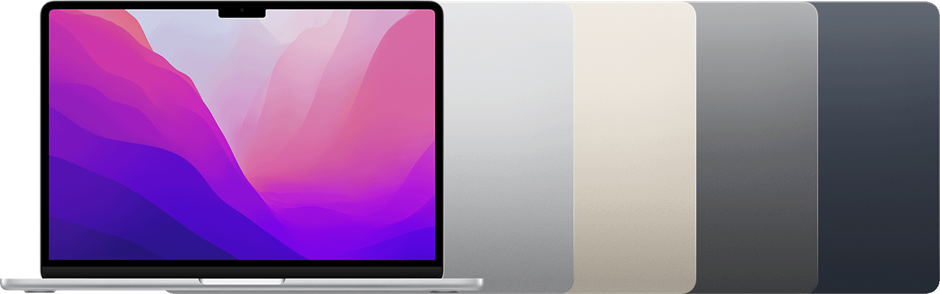
Apple documents a 13.6-inch display and a notch around the camera. More working space around the menu bar is useful, but the notch is still something to try with your particular collection of menu-bar utilities. Put the applications you use on screen and check their controls at your preferred scaling. A full-resolution specification tells you about the panel, not how comfortably you can read a spreadsheet after an hour.
The panel is an IPS display, rather than a promise of the contrast behaviour associated with an OLED screen. If colour-critical work is the reason for the purchase, investigate your complete colour-management workflow instead of treating a wide-gamut label as certification. For a second-hand unit, inspect pale and dark backgrounds, the hinges and the surface under normal light. Screen damage is a more immediate ownership problem than a small difference between two healthy panels on paper.
Buy the memory you need, not an upgrade you cannot make
The available memory configurations are materially different purchases. A cheap 8 GB example can be tempting beside a more expensive 16 or 24 GB machine, but the useful comparison is your working set. Include the browser, conferencing software, documents and any creative application running together. Do not assess the laptop with everything closed except the program a seller wants to demonstrate.
Memory is not an ordinary later upgrade on this design. That changes how to spend a limited budget: sufficient memory may matter more than choosing the higher GPU configuration for an occasional task. Internal storage capacity is another fixed decision, although external storage can take on some files. Count the data that must travel without an attached drive. Backups require a separate plan; buying a larger internal SSD does not create a second copy of anything.
Fanless means a quiet mechanism, not unlimited sustained work
Apple’s launch material confirms the absence of a cooling fan. For writing near a microphone or working in a quiet room, that is a useful design characteristic. It does not prove that the computer will complete every demanding task at the same speed from start to finish. Long exports, large builds and repeated processing jobs should be investigated with representative files. A short demonstration can answer whether an application opens while leaving sustained behaviour unanswered.
M2 includes hardware video-processing facilities, but codec support is not a substitute for checking the rest of an editing workflow. Effects, source formats, project size and connected storage all affect the job. We have not measured export times, surface temperatures or performance under load. If completing sustained work on a deadline is central to the purchase, a properly configured actively cooled alternative deserves comparison, even if the smaller Air is more attractive to carry.
RTINGS tested the base 8 GB, 256 GB configuration and found that its performance fell under sustained heat. That is independent evidence from a specified sample, rather than an observation made here. It supports treating lengthy workloads separately from everyday responsiveness; it does not predict the condition of a used example.
One native external screen is an important stopping point
This M2 model supports one native external display. A dock with two HDMI sockets does not change that limit. Someone who routinely needs a pair of external monitors should resolve the requirement before paying for the laptop, rather than treating the dock as a future rescue. The built-in screen plus one external screen can still make a useful workspace, provided that is the arrangement you actually want.
Software-driven display adapters are a separate approach with separate dependencies. Examine their software requirements, permissions and suitability for the work involved; do not assume they behave exactly like native video connections. For a straightforward one-screen desk, verify the actual monitor and cable. Charging, waking and peripheral reconnection belong in the same check. The right laptop can be the wrong workstation if its display arrangement makes your daily routine unnecessarily awkward.
Video calls and the keyboard deserve their own inspection
The documented 1080p camera is an improvement in specification over the M1 Air’s 720p unit. It is not a guarantee that your meeting will look good in a dim room, or that a conferencing service will transmit all the detail the camera captures. Test the intended application, framing and lighting. If a desk camera is already part of your setup, the built-in camera may be a smaller reason to spend more.
The keyboard, trackpad, audio output and microphones are the surfaces and devices you will use repeatedly. Type more than a password. Try shortcuts, gestures and the headphone connection you depend on. A sticky key or unreliable trackpad can outweigh a favourable processor specification. Check Touch ID with a clean setup when possible, rather than accepting an unexplained demonstration failure. Cosmetic wear and functional faults should be described separately by the seller.

A good older Air needs a complete purchase calculation
Apple’s endurance figures describe specified test conditions, not the remaining capacity of a laptop that has been used for several years. Inspect battery information, ask about service history and leave enough return time to observe your normal work. A full charge displayed in a listing cannot establish how long the machine will last. Likewise, unused old stock still needs inspection rather than an automatic assumption that its battery behaves like a newly manufactured one.
For Canada and the US, compare the delivered price, tax, charger, return shipping and warranty terms in the same currency. Confirm that previous accounts and organizational management have been removed before migrating your files. The M2 Air earns a place on a shortlist when condition, configuration and seller protection line up. It becomes harder to justify when a low headline price expands into a charger, dock and service bill. We are withholding a numerical score rather than assigning precision to that unresolved purchase.
Sources & further reading.
These are the sources behind this research review. Manufacturer claims are not independent performance measurements. Community accounts, when cited, describe individual experiences.
- Apple: 13-inch M2 Air technical specifications ↗manufacturer
- Apple: June 2022 launch and fanless design ↗manufacturer
- RTINGS: independently tested 2022 M2 Air ↗independent review
Documentation reviewed: 9 October 2026. Product software and regional bundles can change. Corrections and editorial disclosures.