Not tested. This is a research score for the documented features, compatibility and ownership trade-offs discussed in this review, not a performance measurement.
Features & capability 30%7.7
Excellent build, 120Hz touchscreen and long battery, held back by a low-power Core 5 320 that trails the Neo and an 8GB base that failed outlets' benchmarks.
Compatibility & connectivity 20%7.4
Two 10Gbps USB-C ports with DisplayPort 2.1 and Wi-Fi 7, but no headphone jack, no card reader and no Thunderbolt on the Core 5 model.
Ownership & upkeep 20%7.2
Swappable 2230 SSD and a replaceable-looking battery, but soldered memory, stubborn clips and a one-year mail-in base warranty in Canada.
Setup & everyday use 15%8.1
1 kg weight, tiny 65W charger and a clean Windows install make daily use easy; the 8GB model's lag and warm lap use cost points.
Documentation & support clarity 15%7.5
Dell.ca specs are clear, but multi-sourced screens and SSDs, QLC upgrade drives and shifting configs make it harder to know exactly what arrives.
Compare scores within the same product category. Small decimal differences should not override your needs or the evidence limits.
How the Standpoint Score works
We score five aspects of the documented product on a 0–10 scale, then calculate a weighted total:
- Features & capability30% of the total
- Compatibility & connectivity20% of the total
- Ownership & upkeep20% of the total
- Setup & everyday use15% of the total
- Documentation & support clarity15% of the total
This product’s 7.6/10 is an editorial research assessment. It does not claim measured performance, tested reliability or a verified customer satisfaction rate. Compare it with products in the same category, and read each criterion’s reasoning above.
Read the full rubric and score bands ↗From a tech standpoint.
The 2026 XPS 13 is the nicest-built Windows laptop near its price, with battery life that beat the MacBook Neo in Tom's Hardware's testing and a 120Hz touchscreen and backlit keyboard the Neo doesn't have. The catch is memory: the 8GB base model stumbled in every major review, and it's soldered, so you can't fix it later. Canadian pricing also takes the shine off, since $949.99 on Dell.ca buys 8GB and only 256GB of storage. Buy the 16GB version, ideally the $1,199.99 configuration or on sale. If you're open to macOS, the Neo is faster for the same base price, and the MacBook Air M5 at $1,799 is the better laptop to keep for five years.
Reasons to consider it
- Battery life outlasts the MacBook Neo: Tom's Hardware got more than 14 hours in its mixed test, Engadget measured up to 17 hours 40 minutes, and PCMag's video loop ran past 20 hours.
- A 1 kg, 12.7 mm aluminium body that Tom's Hardware found nicer to hold than the Neo, which weighs about half a pound more.
- Screen and keyboard extras the Neo lacks: touch, a 120Hz variable refresh rate, 2560 x 1600 resolution and keyboard backlighting.
- Two 10Gbps USB-C ports, one on each side, that both charge and drive a monitor, plus a phone-sized 65W GaN charger.
Go in knowing
- The 8GB model is a trap: Engadget, PCMag and Tom's Hardware all saw slowdowns or failed benchmarks, and the memory can't be upgraded later.
- Canadian pricing is weak: $949.99 gets only 256GB, and the 16GB/512GB build is $1,399.99, within $400 of a MacBook Air M5.
- No headphone jack, no card reader, and no Thunderbolt on the Core 5 model.
- Slower than the Neo in Geekbench, runs warm under load, and Tom's Hardware measured the screen just under 400 nits against Dell's 500-nit rating.
Affiliate link. As an Amazon Associate, Tech Standpoint earns from qualifying purchases. It never changes our verdict or score. Disclosure
The specification sheet.
Published specifications from the linked sources. Configurations and availability can differ by country.
- Model
- Dell XPS 13 DX13260 (2026)
- Processor
- Intel Core 5 320 (Wildcat Lake), 6 cores (2 performance, 4 low-power efficiency), up to 4.6GHz; Core Ultra 7 355 listed on Dell.ca for $650 extra
- Memory
- 8GB, 16GB or 32GB LPDDR5x at 7467 MT/s, soldered (not upgradeable)
- Storage
- 256GB M.2 2230 TLC SSD (Dell.ca base); 512GB or 1TB QLC options
- Display
- 13.4-inch 2560 x 1600 touchscreen, 30-120Hz, 500 nits rated
- Ports
- 2 x USB-C 10Gbps with DisplayPort 2.1 and charging (Thunderbolt 4 only with Core Ultra); no headphone jack, no card reader
- Battery and charger
- 52Wh, 3-cell; 65W USB-C GaN adapter; Dell claims up to 17 hours
- Size and weight
- 296.9 x 200.7 x 12.7 mm; from 1 kg
- Wireless and camera
- Wi-Fi 7, Bluetooth 6.0; 1080p IR webcam with Windows Hello
- Canadian price (Oct 13, 2026)
- Dell.ca from $949.99 (8GB/256GB); $1,149.99 with 512GB; $1,199.99 for 16GB/256GB; $1,399.99 for 16GB/512GB. Best Buy Canada shows only marketplace open-box units ($1,099.98 for 8GB/512GB, $1,199.98 for 16GB/512GB). No new listing on Amazon.ca.
The $699 XPS 13 costs $949.99 in Canada, with half the storage
The price you've seen in every headline is US$699. On Dell.ca on October 13, 2026, the cheapest XPS 13 is $949.99, and that gets you 8GB of memory and a 256GB drive. That's half the storage reviewers got at the US launch price. Apple's MacBook Neo is $949 on apple.com/ca. So in Canada this isn't a cheaper Neo. It's a same-price rival, and the version every reviewer tells you to buy, with 16GB, runs $1,199.99 with 256GB or $1,399.99 with 512GB.
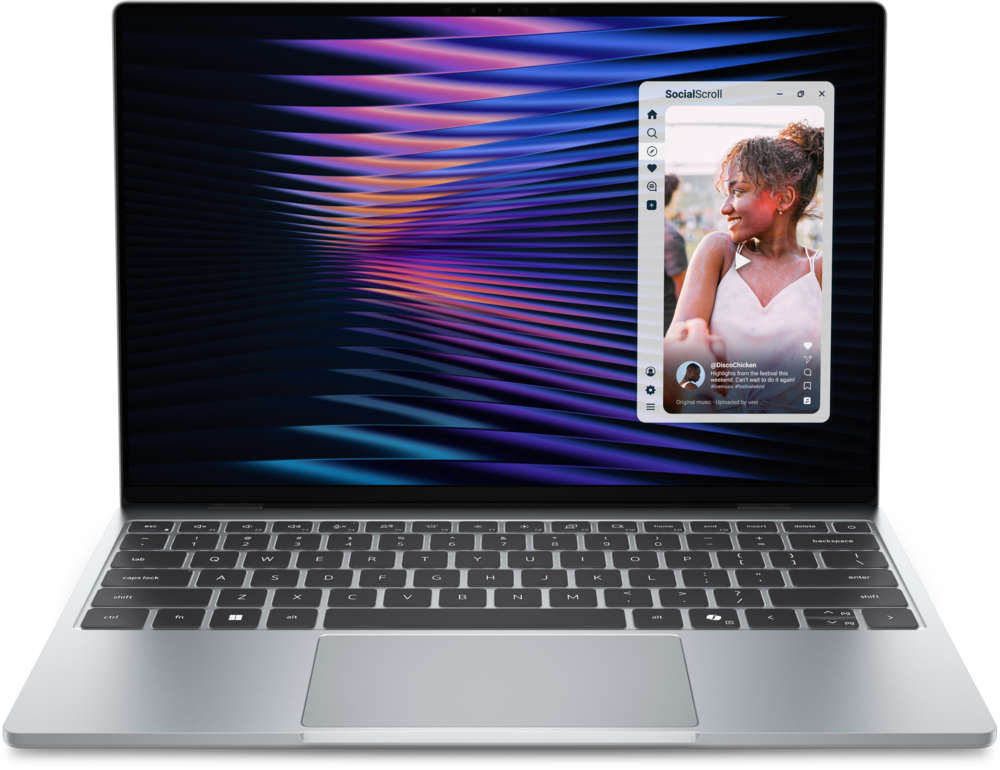
What you're buying is Dell's revived 13.4-inch thin-and-light, model DX13260, built around Intel's low-power Core 5 320, codenamed Wildcat Lake. It weighs 1 kg, it's 12.7 mm thick, and it has a 2560 x 1600 touchscreen that runs at up to 120Hz. The Verge gave it an 8 out of 10 and called it the first real competitor to the Neo. PCMag and Tom's Hardware both gave it Editors' Choice awards.
So the question here is practical: which XPS 13 should a Canadian buy, and is it worth it over a Neo or a MacBook Air at these prices? Short answer: skip the 8GB model, and think hard before you pay $1,399.99.
Cheaper, lighter and plainer than the XPS 13 it replaces
The last XPS 13 was a different animal. Engadget points out that previous models started at US$1,300 to US$1,400 and ran Snapdragon X Elite or Core Ultra chips. In Engadget's graphics tests, the 2024 Snapdragon model was roughly twice as fast as the new one and the 2024 Intel model about three times as fast. This is a deliberate step down the ladder, priced to fight Apple rather than to sit below the XPS 14.
Here's what Dell dropped. The flush haptic trackpad is gone, replaced by a regular mechanical clickpad that Tom's Hardware notes is slightly recessed so you can feel its edges. The edge-to-edge keys are now ordinary chiclet keys. The OLED screen option older XPS 13s offered isn't on the Dell.ca configurator, and there's no headphone jack on any version. On the Core 5 model, the two USB-C ports are 10Gbps with DisplayPort 2.1 and charging, not Thunderbolt. What it gained: a 1 kg weight, a 120Hz touchscreen, quad speakers, Wi-Fi 7 and a tiny 65W charger.
Dell.ca now also lists a Core Ultra 7 355 upgrade for $650 extra, plus 32GB and 1TB options. PCMag reported those Panther Lake models would add Thunderbolt 4. None of the reviews covered here tested that chip, so this review is about the Core 5 version. Who shouldn't upgrade? Anyone with a 2024 XPS 13. Engadget's numbers say you'd get a slower laptop, and its Snapdragon XPS 13 test already ran close to 18 hours on battery.
Every outlet reached the same verdict on 8GB of memory
Reviewers don't agree on much as firmly as this. Engadget found about 80% of the 8GB model's memory already taken by Windows background services at boot, and roughly 95% once a few browsers were open. Scrolling stuttered, and one notes app took around 30 seconds to show its notes. Engadget scored it 7.5 out of 10, largely for that reason.
Tom's Hardware opened 15 Chrome tabs on both versions. The 16GB machine stayed smooth, while the 8GB unit often flashed a blank white page when switching tabs. PCMag's 8GB unit couldn't finish its Photoshop benchmark or Cinebench at all, while the 16GB unit completed everything. Engadget's follow-up on September 29 measured the 16GB model about 30% higher in PCMark 10 (6,904 versus 5,319) and found it lasted 1 hour 44 minutes longer on battery, likely because the 8GB machine kept using its SSD as overflow memory.
The Verge is the most generous. It says the base XPS 13 feels competent, unlike many 8GB Windows laptops, and it still tells you to get 16GB. The memory is soldered to the board, so there's no adding more later. If you're keeping this laptop for four years of school or work, the 8GB model is a false economy. On Dell.ca, 16GB costs $250 more, which makes the real starting price $1,199.99.
Battery numbers that beat the Neo in three different tests
Battery is where every outlet comes back happy, even though they all test differently. Tom's Hardware's mix of web browsing, graphics and video streaming at 150 nits got both versions past 14 hours, about an hour to 90 minutes more than the MacBook Neo. Engadget's PCMark 10 office test hit 15 hours 56 minutes on 8GB and 17 hours 40 minutes on 16GB. PCMag's local video loop at 50% brightness ran for more than 20 hours on the 8GB unit. Dell itself claims up to 17 hours.
In practice, that's a full day of lectures plus the GO train home without packing a charger. If you do carry one, Dell's 65W GaN adapter is tiny. Tom's Hardware compared it to a phone charger, with folding prongs and a removable cable, and Dell.ca offers a wall-plug version at no extra cost. It has only one USB-C output, so it won't charge your phone at the same time.
There's one catch. Tom's Hardware's 8GB unit ran about half an hour shorter than its 16GB unit, and it suspects the different SSD inside. Dell told Tom's it uses screens from more than one supplier, and the SSD brand varies too, so two XPS 13s that look identical might not behave identically. Battery life is settled, then. The bigger question is how much speed you're giving up to get it.
Wildcat Lake is a Neo-class chip, not an XPS-class one
The Core 5 320 has six cores: two performance cores that boost to 4.6GHz and four low-power efficiency cores. Its graphics use just two Intel Xe cores. It's built for browsing, documents and video calls, and that's the honest ceiling. Tom's Hardware found the Neo clearly ahead in Geekbench 6, by a wide margin on single-core. The 16GB model's 10-run Cinebench 2026 loop started at 1,443 and settled in the high 1,600s.
Outlets split on video encoding. Tom's had the 8GB XPS 13 a little behind the Neo in its HandBrake conversion, while PCMag found the XPS faster than the Neo in HandBrake and slower in Geekbench. Either way, these two are neighbours, not machines from different classes. For contrast, Dell's XPS 14 with a Core Ultra 7 converted Tom's 4K test file in under seven minutes, which shows what more cores and more power actually buy you.
Heat is the price of a thin chassis. During that stress test, Tom's Hardware saw the performance cores spike to 100°C, with the underside reaching about 42°C. The Verge lists getting warm on your lap as a downside. The XPS 13 has two fans, so it isn't silent like a fanless Mac under load, though Tom's described the noise as a soft whir. Gaming is off the table: the 8GB model wouldn't even run 3DMark Steel Nomad for Tom's Hardware or PCMag.
A 120Hz touchscreen, loud speakers and no headphone jack
On paper the screen beats the Neo's: 13.4 inches, 2560 x 1600, touch, and a 30-120Hz variable refresh rate, where Apple's is 60Hz with no touch. Tom's Hardware measured over 100% of sRGB and about 75% of the wider DCI-P3 colour range, but peak brightness came in just under 400 nits, below Dell's 500-nit rating and the Neo's measured 452.6 nits. PCMag found it looked dim by eye unless brightness was near maximum.
There's a bit of a panel lottery, too. Tom's got one Sharp and one LG screen across its two units, with different viewing angles and backlight glow, and its 16GB unit flickered on battery until variable refresh was switched on. Dell told Tom's that setting should be on by default. Reviews even disagree on the finish: PCMag describes a matte coating, while Notebookcheck's review roundup lists glossy reflections as a con. Check your screen closely in the first week.
Speakers divide opinion as well. Tom's Hardware called the quad-speaker setup, rated at 8W, excellent for its size, while Engadget found it clear but tinny. The keyboard is backlit, which the Neo's isn't, though travel is shallow. The Verge rates the trackpad great, but Engadget says its top third won't click at all. Ports are two 10Gbps USB-C, one on each side, which beats the Neo's mix of one fast and one USB 2.0 port. Wired headphones need a USB-C adapter.
Neo, MacBook Air or a cheaper Windows laptop at Canadian prices
The MacBook Neo is $949 with 256GB or $1,149 with 512GB and Touch ID on apple.com/ca. It only comes with 8GB; there's no 16GB version. It's fanless, keeps a headphone jack, and posted the faster Geekbench scores for both Tom's Hardware and PCMag. Pick it if you live on an iPhone or prefer macOS. Pick the XPS if you want Windows, touch, a backlit keyboard and 120Hz.
The MacBook Air M5 13-inch starts at $1,799 with 16GB and 512GB, and our MacBook Air M5 research review scored it 8.4. The 16GB/512GB XPS 13 at $1,399.99 is $400 cheaper, but it's a much slower machine. If your budget can stretch, the Air is the safer laptop to keep for five years. Our older MacBook Air M2 review is worth a look if you can find one discounted.
On the Windows side, Best Buy Canada listed the Lenovo IdeaPad Slim 3x (15.3-inch, Snapdragon X, 16GB, 512GB) at $1,099.99 on sale on October 13, and the Asus Zenbook A14 with Snapdragon X2 Elite, OLED, 16GB and 512GB at $1,799.99. The Lenovo gets you 16GB for less than an 8GB, 512GB XPS 13, but it's a bigger laptop with an Arm chip, so check your apps first. PCMag also felt the 16GB XPS looked weak value next to HP's OmniBook 5 14.
Soldered memory, a swappable SSD and a one-year mail-in warranty
Dell.ca's base warranty is Basic Hardware Service with Mail-In, and Best Buy Canada's listing shows one year of parts and labour. Dell Canada's return policy gives you 30 days from the invoice date. Use that window properly: open a pile of tabs, watch a movie on battery to check for flicker or glow, and make sure Wi-Fi holds a connection. Dell.ca also offers a French Canadian backlit keyboard at no extra charge.
For repairs, Tom's Hardware found four small Torx screws and some of the most stubborn clips it had dealt with in years. Inside, the short M.2 2230 SSD is easy to swap and the battery didn't look hard to replace. The memory is soldered. Dell.ca lists the 256GB base drive as TLC and the 512GB and 1TB upgrades as QLC, a denser, cheaper type of flash that tends to slow down on long file copies. Buying 256GB and swapping in a bigger 2230 drive later is a real option.
Software is refreshingly light. Tom's Hardware described the Windows install as clean, with a couple of Dell utilities and a McAfee bookmark. Dell.ca's spec list includes a McAfee+ Premium subscription that doesn't auto-renew and a 30-day Microsoft 365 trial, so uninstall what you won't use. Engadget saw idle memory use on its 16GB unit fall from 56% to about 40% after a pending Windows update installed.
On Reddit, the loudest pattern in r/Dell and r/laptops is pricing: many separate posters outside the US say the XPS 13 costs far more locally than the US$699 headline, sometimes more than a Neo. The other is the 8GB worry, with most owners steering buyers to 16GB. A few individual owners mention heat, a unit that struggled to power on, or a Wi-Fi fault fixed by an exchange. That's too few reports to call a trend, but it's a reason to buy where returns are easy.
Buy the 16GB model, skip the 8GB one, or buy a Mac
Buy the XPS 13 with 16GB if you want Windows, travel light and care more about battery life than speed. A student in residence, someone who works from cafés, a parent buying a teenager's first proper laptop: in Canada, this is the best-built Windows option near $1,200. The $1,199.99 16GB/256GB configuration is the sweet spot if your files live in OneDrive or Google Drive.
Skip the 8GB model, full stop. Skip the whole line if you edit video, play games or use wired headphones every day. If you already live in Apple's world, the Neo costs the same as the base XPS and benchmarks faster. If you can spend $1,799, the MacBook Air M5 is the better long-term laptop. And watch the price: in September, The Verge listed the 16GB model at US$850 at Best Buy against about US$1,000 at Dell, so XPS pricing clearly moves. If you can wait for a Canadian sale, wait.
Questions before checkout.
Is 8GB of RAM enough on the 2026 Dell XPS 13?
For light browsing and documents it works, and The Verge found it more usable than most 8GB Windows laptops. But Engadget, PCMag and Tom's Hardware all saw slowdowns or failed benchmarks, and the memory is soldered. Buy 16GB if you plan to keep it more than a year or two.
Should I buy the XPS 13 or the MacBook Neo in Canada?
At the base level they cost the same: $949.99 for the XPS with 8GB and 256GB, $949 for the Neo. The Neo is faster in Geekbench and fanless. The XPS adds touch, 120Hz, a backlit keyboard, longer battery life in Tom's Hardware's test, and a 16GB option the Neo doesn't offer.
Is it worth upgrading from a 2024 Dell XPS 13?
No. Engadget's tests show the 2024 Snapdragon and Intel XPS 13 models were faster, especially in graphics, and the Snapdragon version ran close to 18 hours on battery. The 2026 model is a cheaper, lighter laptop, not a faster one, so it only makes sense if your current one is failing.
Can I upgrade the memory or storage later?
The memory is soldered, so whatever you buy is what you keep. Storage is a short M.2 2230 SSD that Tom's Hardware says is easy to swap once you get past the stubborn bottom-panel clips. That makes the $1,199.99 16GB/256GB Dell.ca configuration a sensible buy if you're comfortable upgrading the drive yourself.
Does the XPS 13 have a headphone jack or a French Canadian keyboard?
There's no headphone jack on any 2026 XPS 13, so wired headphones need a USB-C adapter or you'll switch to Bluetooth. Dell.ca does offer a French Canadian backlit keyboard at no extra cost, alongside the English (US) layout, when you configure the laptop.
Where can I buy the 2026 XPS 13 in Canada?
As of October 13, 2026, Dell.ca sells it new from $949.99. Best Buy Canada only showed marketplace open-box and refurbished units, from $1,049.98, and Amazon.ca had no new listing. Buying from Dell.ca gets you a 30-day return window from the invoice date and Dell's one-year mail-in warranty.
Sources & further reading.
These are the sources behind this research review. Manufacturer claims are not independent performance measurements. Community accounts, when cited, describe individual experiences.
- Dell Canada: XPS 13 (DX13260) product page and configurator ↗manufacturer
- Dell Canada: XPS laptop line and base prices ↗manufacturer
- Dell Canada: return policy ↗manufacturer
- The Verge: The Dell XPS 13 is the first real competitor to the MacBook Neo ↗independent review
- Engadget: Dell XPS 13 (2026) review, a MacBook Neo alternative that needs more RAM ↗independent review
- Engadget: The midrange Dell XPS 13 is the one you actually want ↗independent testing
- Tom's Hardware: Dell XPS 13 (2026) review ↗independent testing
- PCMag: Dell XPS 13 (2026) review ↗independent testing
- Notebookcheck: Dell XPS 13 (2026) DX13260 reviews and specs roundup ↗independent review
- Apple Canada: Buy MacBook Neo ↗retailer
- Apple Canada: Buy MacBook Air ↗retailer
- Best Buy Canada: open-box Dell XPS 13 DX13260 (marketplace) ↗retailer
- Best Buy Canada: Snapdragon Copilot+ PCs (Lenovo IdeaPad Slim 3x, Asus Zenbook A14 prices) ↗retailer
- r/laptops: Why do people prefer the MacBook Neo over the Dell XPS 13? ↗Community discussion
- r/Dell: The XPS 13 2026 has horrible regional pricing ↗Community discussion
- r/laptops: Dell's budget XPS 13 costs far more in Europe ↗Community discussion
- r/Dell: Dell XPS 13 2026 owner review thread ↗Community discussion
Product software and regional bundles can change. Corrections and editorial disclosures.
Affiliate link. As an Amazon Associate, Tech Standpoint earns from qualifying purchases. It never changes our verdict or score. Disclosure