Not tested. This is a research score for the documented features, compatibility and ownership trade-offs discussed in this review, not a performance measurement.
Features & capability 30%8.7
HDR-capable display and differentiated Pro/Max hardware form a useful documented creative-work package.
Compatibility & connectivity 20%8.7
Built-in ports and chip-specific external-display support are practical, with 2021 HDMI limits retained.
Ownership & upkeep 20%7.2
Used battery condition, fixed configuration decisions and potential repair costs require careful price comparison.
Setup & everyday use 15%8.3
Physical function keys and charging options are useful; a successful ownership and management handover is essential.
Documentation & support clarity 15%9.0
Apple documents configuration limits, charging, battery cycles, OS compatibility and account removal specifically.
Compare scores within the same product category. Small decimal differences should not override your needs or the evidence limits.
How the Standpoint Score works
We score five aspects of the documented product on a 0–10 scale, then calculate a weighted total:
- Features & capability30% of the total
- Compatibility & connectivity20% of the total
- Ownership & upkeep20% of the total
- Setup & everyday use15% of the total
- Documentation & support clarity15% of the total
This product’s 8.4/10 is an editorial research assessment. It does not claim measured performance, tested reliability or a verified customer satisfaction rate. Compare it with products in the same category, and read each criterion’s reasoning above.
Read the full rubric and score bands ↗From a tech standpoint.
The 2021 14-inch MacBook Pro pairs a genuinely useful XDR display with the ports a working laptop should have. Its strongest used case is a well-kept configuration bought for a known workload. Condition, account release and the real cost after battery or charger replacement matter more than the original premium positioning. Our 8.4 Standpoint Score is an editorial research assessment, with outside measurements attributed to their reviewer.
Reasons to consider it
- 14.2-inch XDR display with adaptive refresh and clearly separated SDR and HDR brightness ratings
- Built-in SDXC, HDMI, MagSafe 3 and three Thunderbolt 4 ports
- M1 Pro and M1 Max configurations spanning 16 to 64 GB for very different workloads
Go in knowing
- Used condition and account or organisational enrolment can outweigh a low price
- The base 67 W charger does not deliver Apple's documented fast charge
- Memory, display needs and software compatibility should be settled before purchase
Affiliate link. As an Amazon Associate, Tech Standpoint earns from qualifying purchases. It never changes our verdict or score. Disclosure
The specification sheet.
Published specifications from the linked sources. Configurations and availability can differ by country.
- Model covered
- 14-inch MacBook Pro, 2021; M1 Pro or M1 Max
- Base configuration
- 8-core CPU / 14-core GPU M1 Pro; 16 GB memory; 512 GB SSD
- Configured memory
- M1 Pro: 16 or 32 GB; M1 Max: 32 or 64 GB
- Display
- 14.2-inch, 3024 × 1964; adaptive refresh up to 120 Hz
- Brightness rating
- SDR: 500 nits; HDR: 1,000 sustained / 1,600 peak
- Native external displays
- Pro: two 6K/60 Hz; Max: three 6K/60 Hz plus one 4K/60 Hz
- Included adapter at launch
- 67 W with 8-core CPU; 96 W with 10-core CPU or M1 Max
- Weight
- 1.6 kg
A used workstation needs a specific job
The best reason to buy this older Pro is a problem it solves at the desk or on location. Maybe your current laptop needs a card reader, a display adapter and a charger before a shoot can be backed up. Maybe you want to check HDR footage on the built-in screen. Those are concrete reasons. The word Pro on a listing is not: two visually identical machines can differ substantially in memory, graphics and external-display support.
This assessment draws on Apple's model-specific documentation and Andreas Osthoff's Notebookcheck review of the base M1 Pro configuration. Tech Standpoint has not benchmarked a sample; outside testing is used where it answers a practical question and kept separate from the buying judgement. When comparing listings, put the actual configuration, physical condition, included charger and return terms in one note. A dearer example can be better value if it avoids an immediate repair, and a higher-spec chip is worth little when your normal work cannot use it.
M1 Pro and M1 Max are different purchases
Apple's launch documentation sets out the distinction: M1 Pro supports up to 32 GB of unified memory, while M1 Max reaches 64 GB and adds more graphics capacity. Max also has two ProRes accelerators to Pro's one. The base model here is an eight-core CPU, 14-core GPU M1 Pro; do not apply a ten-core or Max result to it because a seller uses the same laptop name.
Pick the configuration by identifying the constraint in your work. A project that fills memory is a different problem from an export that spends its time in a media engine, and a timeline loaded with effects is different again. Ask for an example project to be opened if the seller can reasonably accommodate it, or find independent tests that use your apps on a matching chip. Paying for Max because it topped the range at launch substitutes a historical hierarchy for a present need. It can still be right, but the work should explain why. For ordinary office tasks, a healthy lower configuration leaves more budget for a backup drive or a monitor.
Memory and storage should follow the working set
Memory is shared across the whole system, so treat the quoted capacity as the total resource rather than adding a separate graphics-memory figure to it. A project that opens fine on its own behaves differently with a browser, reference files and another app left running. Compare against the workload you actually keep open, including the moment you least want to close everything and start over.
Internal storage is a workflow decision too. Work out how much must stay free for the system, apps, current projects and their temporary files before counting archived work. External storage suits a large library but brings cables, desk space and a connection that must always be there, and it is no excuse to skip backups. Neither a fast internal SSD nor an external drive holding the only copy protects against deletion or a failed device. Buy the configuration that fits the normal working set without a daily storage shuffle, and get a seller's screenshot that confirms both memory and storage rather than trusting an abbreviated title.
The headline brightness belongs to HDR
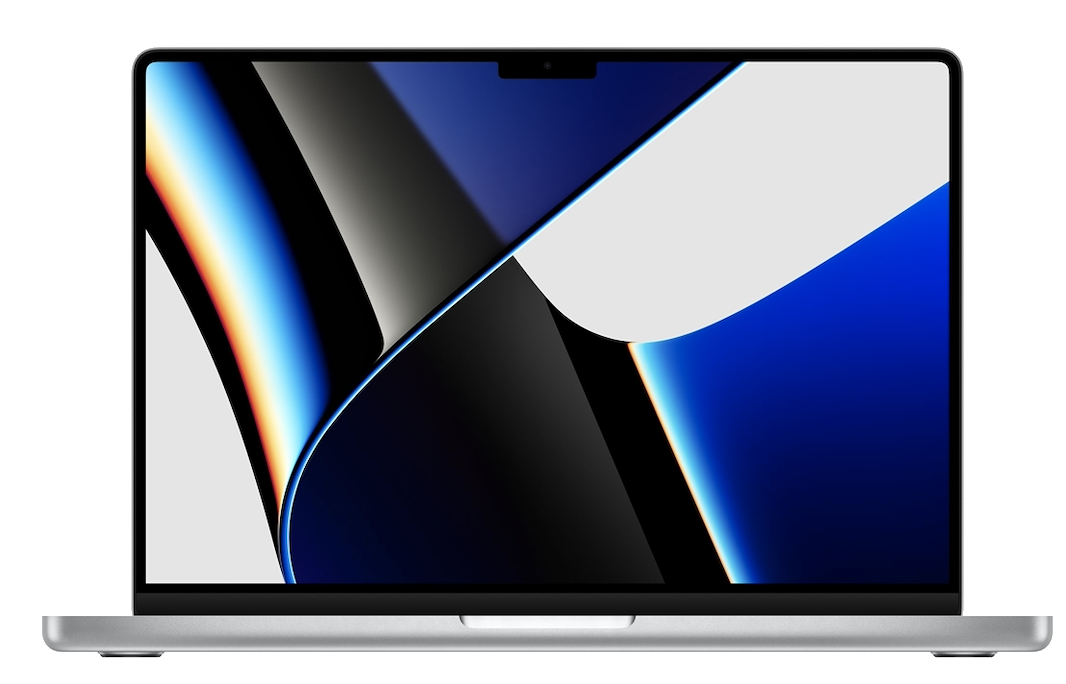
The specification separates SDR from HDR: 500 nits for SDR, with 1,000 sustained and 1,600 peak for HDR. That matters if your reason for buying is an exceptionally bright document screen outdoors. Adaptive refresh can reach 120 Hz; it is not a promise that every app, video or animation runs at that rate. Apple's supplied front view below also shows the camera notch, worth considering with menu-heavy applications.
Think about the screen in two roles. As a mobile editing surface it lets you make visual decisions without waiting to get back to a desk. As the only workspace for a complex project it still has finite room for tools, a timeline and the image. Open the layout you expect to use and judge whether you can read it comfortably. Check a used display with light and dark content, inspect the surface and edges, and move the lid through its range. A pretty sample image in a listing says nothing about the panel you are buying, and colour-critical work still needs a deliberate viewing setup and verification.
The useful ports are the ones your gear can use
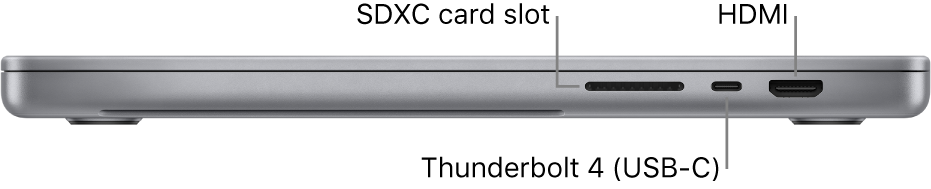
Apple brought back SDXC and HDMI alongside three Thunderbolt 4 ports, MagSafe 3 and a headphone jack. The right-side illustration below shows the card slot, HDMI and one Thunderbolt port. For someone importing camera files while connecting a presentation screen, those built-in connections remove small, persistent accessory chores. That convenience is real even when it does nothing for the main app's speed.
There are still reasons to check your actual equipment. Native display support depends on the chip, and Apple rates this model's HDMI output at up to 4K at 60 Hz, so do not borrow a newer MacBook Pro's HDMI claims. If the desk needs a particular resolution, refresh rate or dock arrangement, test that combination during the return window. An SD slot is useful only when it matches the cards in your workflow; a card format that needs its own reader does not become compatible because a slot exists. Leave room in the budget for the adapters you still need, and test every port on used hardware rather than letting one successful connection vouch for the rest.
Charging should fit the way the laptop travels
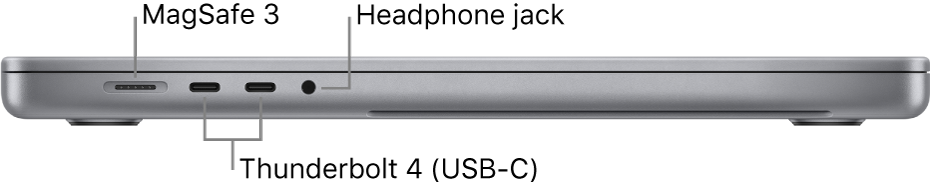
The left-side illustration shows MagSafe, two Thunderbolt ports and the headphone jack. Apple's current fast-charge guide lists a 96 W adapter with either MagSafe 3 or a USB-C charging cable for the 14-inch 2021 model, and its roughly 50 percent in 30 minutes claim carries test conditions. The 67 W adapter supplied with the base configuration does not deliver that experience, and a listing should not imply it does.
For a laptop that spends most of the day plugged in, fast charging is a minor convenience. For one moving between short meetings and journeys, recovering useful charge in a break matters more. Check which adapter and cable are actually included in a used sale; a charger somewhere in the photos is not enough. A replacement needs an appropriate rating and condition, and the complete arrangement should be tested. Do not carry the different charging restrictions of the 2021 16-inch model over to this one. MagSafe and USB-C give you options, but the specific adapter and cable decide whether the claimed mode is available.
Battery results swing with screen brightness and task
Notebookcheck tested the base eight-core CPU, 14-core GPU model with 16 GB of memory and a 512 GB SSD. Its Safari 15.1 Wi-Fi test lasted 13 hours 36 minutes at 150 nits, but 6 hours 30 minutes at the maximum 500-nit SDR setting. Maximum-brightness HDR playback lasted about four hours. Those are that review's measurements, not Tech Standpoint results or promises for an older used battery.
The useful lesson is the size of the gap between tasks. A seller quoting one battery figure cannot tell you whether your brightest-screen working day fits inside it. Consider when a socket is available and which parts of the job must be done away from one, then assess the battery in the actual unit. A laptop that once suited a long day of browsing may need a different charging routine after years of use. If a return period allows it, run a representative project at your normal screen setting; that answers the ownership question far better than trying to reproduce an ideal video-loop number.
Performance claims need the right generation and workload
Osthoff's base-model review found impressive processor efficiency while noting that the 67 W adapter slightly constrained combined CPU and GPU workloads. That is a specific observation about the reviewed configuration. It does not establish a current comparison against every newer laptop or describe how every M1 Max configuration behaves. Launch-era superlatives need their original comparison date attached.
The media engines are a reason to investigate this machine for video, not a shortcut around checking your format and application. Find a test with the footage, effects and export path you use. For audio, track count tells you less than the plug-ins and latency requirements. For development, a short compile and a long sustained build are different scenarios. Compatibility comes before speed: confirm the supported versions of essential tools and peripherals. A promising benchmark cannot compensate for a driver or plug-in the job needs but cannot run. Treat this as a capable candidate for a defined workflow rather than a universal answer to every professional task.
Keyboard, camera and speakers belong in the inspection
The launch brought back a full-height row of physical function keys in place of the Touch Bar, along with a 1080p camera and a six-speaker system. Those are part of the everyday package, not extras to a processor score. Someone who joins calls all day or works without external speakers values them differently from someone whose laptop lives docked with the lid closed.
On a used unit, test the ordinary controls. Type on every key, try the trackpad across its surface and check the camera produces an image. Listen to both sides at a sensible volume for an obvious rattle or imbalance. Check the keyboard layout if buying across regions; a configuration that suits the workload can still have a layout you dislike. Open and close the lid, examine the feet and inspect the charging connectors for damage. None of this is a laboratory evaluation, but it is a practical way to avoid inheriting a fault that interrupts the very work the machine was bought for.
A low cycle count is only one battery clue
Apple lists a maximum cycle count of 1,000 for the 14-inch 2021 model. A cycle is cumulative use of a full battery's charge, not every time you plug in. Apple explains that batteries have finite life and that diminished runtime can continue past the listed limit. Its instructions show the count under Power in System Information.
Use that number alongside the reported battery condition and observed behaviour. It is not a countdown of guaranteed good days, and a screenshot from months ago is weak evidence of the unit's current state. Ask whether the battery has been serviced and whether the repair is documented. Get a current service quote if replacement looks likely, add it to the asking price, then compare other options. Keep the inspection proportionate: the aim is to understand the cost and reliability of the purchase, not to reconstruct every charge. A clear return policy is valuable when the battery cannot be evaluated properly before payment.
Resolve ownership and management before handover
Apple's sale-preparation guide directs eligible Apple-silicon Macs on Monterey or later to Erase All Content and Settings after a backup. Its Activation Lock guide explains why a remote erase alone can leave the Mac tied to the previous owner. Have the seller follow the applicable account-removal process and confirm you can complete setup without anyone else's credentials.
Organisational management is a separate issue. Apple's deployment guide says automated enrolment can prevent a user from removing management, and that a registered Mac can require enrolment during setup. An ordinary-looking desktop is not proof that an ex-business machine is ready for personal ownership. If an organisational enrolment screen appears, stop the handover and have the seller resolve it with the organisation. Do not accept a workaround that merely hides the prompt. Account release, working hardware and a usable configuration are all part of what you are paying for, and none should wait until after an irreversible purchase.
The value is in a verified, suitable example
Apple currently lists the 2021 14-inch MacBook Pro as compatible with macOS Tahoe 26. That confirms support for that named version; it does not say how many future releases the machine will receive. Check the requirements of the apps you plan to keep using, and do not pay as though an unknown future support period were guaranteed.
Our 8.4 Standpoint Score rewards the documented screen, connectivity and configuration range while accounting for used-condition uncertainty and the cost of a poor specification choice. The strongest candidate has memory and display support that fit the work, a battery cost that is understood and clear ownership. Compare its full cost with a newer machine carrying proper warranty or return coverage. There is no single used price at which every 2021 Pro becomes a bargain. When the hardware solves a real workflow problem and the sale can be verified, it remains persuasive. When the attraction is mostly that it once occupied the expensive end of Apple's range, keep looking.
The closest alternatives.
| Product | Standpoint Score | Best for | Price |
|---|---|---|---|
| Apple MacBook Pro 14-inch (2021)This review | 8.4Research | Mac users who need built-in card and display connections, want an HDR-capable screen and can verify a used machine's… | Amazon.ca ↗ |
| Apple MacBook Air 13-inch (M5) | 8.4Research | A mobile writer, student or mixed-workload Mac user who values portability and can plan the configuration up front. | Amazon.ca ↗ |
| Apple iPad Air (M4) | 8.1Research | Someone who needs a tablet for drawing, documents and travel, not someone assuming every laptop task will transfer. | Amazon.ca ↗ |
| Apple MacBook Air (Intel, 2020) | 6.4Research | A buyer with a verified Intel-specific application or peripheral requirement, or a two-monitor desk, and realistic… | Amazon.ca ↗ |
Compare scores within a category: Tested means our own use, Research means documentation and attributed outside testing. Price links are affiliate links. As an Amazon Associate, Tech Standpoint earns from qualifying purchases. Disclosure
Sources & further reading.
These are the sources behind this research review. Manufacturer claims are not independent performance measurements. Community accounts, when cited, describe individual experiences.
- 2021 14-inch model specifications and supplied images ↗manufacturer
- Original launch: media engines, ports and everyday hardware ↗manufacturer
- Andreas Osthoff’s Notebookcheck base-model testing ↗independent
- Fast-charge adapters and cable requirements ↗support
- Battery cycle count and model-specific limit ↗support
- macOS Tahoe 26 compatible models ↗support
- Preparation before selling a Mac ↗support
- Activation Lock and account removal ↗support
- Organizational automated enrollment restrictions ↗support
Product software and regional bundles can change. Corrections and editorial disclosures.
Affiliate link. As an Amazon Associate, Tech Standpoint earns from qualifying purchases. It never changes our verdict or score. Disclosure