An editorial assessment of documented capabilities and ownership trade-offs. This is not a hands-on test result or a measurement of reliability.
Features & capability 30%9.0
M2 Pro/Max, media capabilities and XDR display support a broad professional role.
Compatibility & connectivity 20%9.0
Advanced HDMI arrangements, Thunderbolt 4 and Wi-Fi 6E provide documented flexibility.
Ownership & upkeep 20%7.5
Configuration-dependent limits and expensive components require disciplined used buying.
Setup & everyday use 15%8.4
The compact Pro format and direct connections suit varied work, with a capable but complex range to choose from.
Documentation & support clarity 15%9.1
Apple explicitly ties high memory and display limits to particular configurations.
Compare scores within the same product category. Small decimal differences should not override your needs or the evidence limits.
How the Standpoint Score works
We score five aspects of the documented product on a 0–10 scale, then calculate a weighted total:
- Features & capability30% of the total
- Compatibility & connectivity20% of the total
- Ownership & upkeep20% of the total
- Setup & everyday use15% of the total
- Documentation & support clarity15% of the total
This product’s 8.6/10 is a provisional research assessment. It does not claim measured performance, tested reliability or a verified customer satisfaction rate. Compare it with products in the same category, and read each criterion’s reasoning above.
Read the full rubric and score bands ↗The ownership case.
A strong documented workstation option when its memory and display capabilities address a real need. Distinguish this early-2023 M2 generation from later machines also advertised simply as a 2023 MacBook Pro.
Reasons to consider it
- Expanded HDMI display possibilities
- Broad memory range with the appropriate chip
- Practical ports and high-specification built-in display
Go in knowing
- 2023 listings may refer to different processor generations
- Maximum memory and display claims do not apply to every configuration
- Higher-end chip may add cost without helping a modest workload
The specification sheet.
Published specifications from the linked sources. Configurations and availability can differ by country.
- Chip family
- M2 Pro or M2 Max
- Display
- 14.2-inch Liquid Retina XDR; 3024 × 1964
- Refresh
- Adaptive ProMotion up to 120 Hz
- Memory
- 16–96 GB, depending on chip and GPU configuration
- HDMI capability
- Up to 8K/60 or 4K/240 in specified arrangements
- Ports
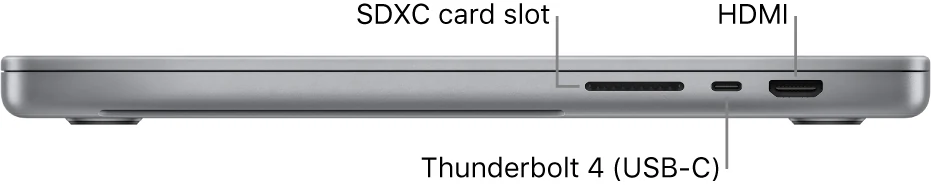
- Three Thunderbolt 4, HDMI, SDXC, MagSafe 3 and headphone jack
- Wireless
- Wi-Fi 6E; compatible network and regional conditions apply
Early 2023 is part of the model's identity
The 14-inch MacBook Pro reviewed here is the M2 Pro or M2 Max generation introduced in early 2023. A listing that merely says 2023 MacBook Pro can be ambiguous because other processor generations also appeared in that calendar year. Verify the chip and model information directly before comparing prices or assuming a particular feature set. The year is useful context, not a complete specification.
This generation is interesting when its configuration range and display connections solve a concrete professional requirement. A buyer should identify that requirement before paying for the largest available chip. Our assessment examines Apple's documented capabilities and the practical used-ownership questions around them. It is not a benchmark report and does not establish that a particular refurbished example can sustain a specified rendering speed or deliver a claimed battery duration.
HDMI capability can be a decisive upgrade
Apple documents higher-resolution and high-refresh HDMI arrangements, including an 8K or very high-refresh 4K option under stated conditions. That matters to a buyer with a particular display already chosen. It should not be read as permission to combine every maximum from the specification sheet simultaneously. The supported arrangement depends on the chip, number of screens and connection path.
Write down the actual monitor setup, including resolution, refresh rate and input requirements, then compare it with the precise configuration's support table. Test the intended cable and display during the return period. A screen lighting up is only the first check; confirm the desired operating mode and stable reconnection after sleep. This generation's display flexibility is a useful reason to pay more when it meets a real need, rather than a theoretical advantage that remains unused.
M2 Pro and M2 Max are different purchase propositions
The product family includes different CPU and GPU configurations, and the largest memory option is tied to a particular M2 Max configuration. A seller presenting the family's highest possible figure should not obscure what is actually installed. Inspect the machine information and compare it with the invoice or listing. A familiar enclosure can contain substantially different resources.
Choose according to project requirements, including graphics-heavy work, media processing and the number of external displays. More expensive hardware is not automatically a better value for someone whose tasks rarely use it. Memory, storage and condition may be more important than the highest chip tier. We have not measured relative performance across these versions, so the provisional score recognizes documented potential while requiring the buyer to validate the actual application and workload before depending on the machine professionally.
Memory needs should be established before shopping
A broad configuration range can encourage buying by maximum numbers rather than by the working set. Examine the applications normally open together, the size of projects and the background tools required by the organization. Include browser services and communication software, which may remain active while creative or technical work proceeds. A computer should be sized for that combination, not for an isolated application demonstration.
Storage deserves an equally realistic plan. Source material, caches, temporary exports and local backups can require much more room than the final deliverable. Decide what can live externally and test that arrangement for convenience. Treat installed memory and internal capacity as purchasing decisions rather than relying on an unspecified later modification. The right older workstation has enough headroom for the actual job without spending heavily on a configuration that solves no identifiable problem.
XDR and ProMotion need a content-specific evaluation
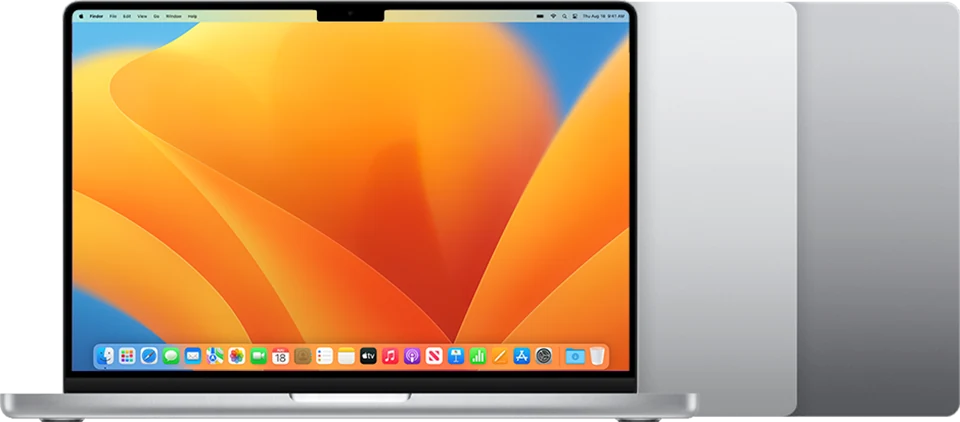
The 14.2-inch Liquid Retina XDR display offers a high-specification built-in workspace with adaptive refresh. Apple's brightness figures distinguish HDR from SDR, so keep that distinction when evaluating claims in a reseller's description. A peak number is not a complete description of a display's behavior with ordinary text, prolonged work or every lighting condition. Use the content and environment relevant to the task.
Inspect the panel for physical and visual defects, including pressure marks, damaged coating and uneven illumination. Test the preferred scaling with actual applications and assess whether the smaller Pro's workspace is sufficient away from a monitor. A creative buyer should also verify the intended colour-management workflow. This review does not measure display accuracy. It identifies a documented capability whose practical value depends on healthy hardware and a suitable setup.
Built-in ports reduce some accessory work
MagSafe charging, SDXC, HDMI and three Thunderbolt 4 ports make this a comparatively well-connected portable Mac. A photographer or presenter may be able to leave certain adapters behind. That benefit should still be checked against the exact equipment involved. Card formats, external drives, audio interfaces and docks can each introduce requirements beyond the existence of a matching socket.
Test the ports that matter with real devices. Transfer data, read a card, connect a display and check power behavior with the intended adapter. Inspect sockets for physical damage and try the arrangement after sleep and reconnection. Wi-Fi 6E is another documented option whose benefit depends on the compatible network and regional conditions. The computer's connectivity is valuable when it makes the actual workspace dependable, not simply when its specification sheet contains more recent standard names.
Used professional equipment needs administrative checks
Ask about the machine's service history, battery condition and any replacement components. A computer used professionally may have accumulated intensive use, although that should not be assumed from the model alone. Inspect the keyboard, trackpad, camera, microphones and speakers through ordinary tasks. Check that the supplied charger and cable suit the configuration and the charging behavior you expect.
Require a clean normal setup with the previous account removed and any organizational management released. Verify current software compatibility, including specialist plug-ins and hardware drivers, before migrating important work. Keep the return terms and invoice, and allow time for a representative project test. A powerful chip does not make an unresolved management enrollment or intermittent port acceptable. The individual computer must be available to its new owner in a practical, usable sense.
The premium is justified by a requirement, not a hierarchy
The M2-generation 14-inch Pro is compelling when its specific memory, display or processing options meet a requirement that a cheaper alternative does not. It is less persuasive when the purchase is driven mainly by the desire to own the newest-looking chip in a used search result. Compare the configuration with an appropriate earlier Pro or newer alternative on equal terms, including condition and seller protection.
Our provisional verdict favors the documented workstation breadth while leaving measured speed and reliability unclaimed. We would want a healthy display, suitable installed resources, a clear battery situation and a successful end-to-end workflow test. Include any accessories and likely service in the final cost. The strongest buying case is a laptop whose capabilities remove recurring obstacles from the work, rather than one whose impressive maximum specifications are never relevant to the owner's actual day.
Sources & further reading.
These are the sources behind this research review. Manufacturer claims are not independent performance measurements. Community accounts, when cited, describe individual experiences.
Documentation reviewed: 9 October 2026. Product software and regional bundles can change. Corrections and editorial disclosures.