
An editorial assessment of documented capabilities and ownership trade-offs. This is not a hands-on test result or a measurement of reliability.
Features & capability 30%8.8
The large XDR screen and Pro/Max platform support demanding documented creative roles.
Compatibility & connectivity 20%8.8
A broad port selection and chip-dependent multi-display support suit workstation use.
Ownership & upkeep 20%7.1
Battery condition, power accessories and premium display repairs can materially affect value.
Setup & everyday use 15%8.0
The large workspace helps away from a desk while making the computer less convenient to carry.
Documentation & support clarity 15%9.0
Apple clearly documents configuration-dependent memory, display and charging requirements.
Compare scores within the same product category. Small decimal differences should not override your needs or the evidence limits.
How the Standpoint Score works
We score five aspects of the documented product on a 0–10 scale, then calculate a weighted total:
- Features & capability30% of the total
- Compatibility & connectivity20% of the total
- Ownership & upkeep20% of the total
- Setup & everyday use15% of the total
- Documentation & support clarity15% of the total
This product’s 8.4/10 is a provisional research assessment. It does not claim measured performance, tested reliability or a verified customer satisfaction rate. Compare it with products in the same category, and read each criterion’s reasoning above.
Read the full rubric and score bands ↗The ownership case.
A serious older workstation candidate when the larger display and exact configuration serve the workload. The purchase should include battery condition, the proper charger and a realistic portability trial.
Reasons to consider it
- Large built-in creative workspace
- Direct HDMI and SD-card connectivity
- Chip-dependent multi-display and media capabilities
Go in knowing
- Size and complete carry weight are material
- M1 Pro and Max configurations are not interchangeable
- A large original battery is not proof of used endurance
The specification sheet.
Published specifications from the linked sources. Configurations and availability can differ by country.
- Processor family
- M1 Pro or M1 Max; ten-core CPU configurations
- Display
- 16.2-inch Liquid Retina XDR; 3456 × 2234
- Refresh
- Adaptive ProMotion up to 120 Hz
- Memory
- 16 to 64 GB depending on chip configuration
- Battery specification
- 100 Wh original design capacity
- Charging
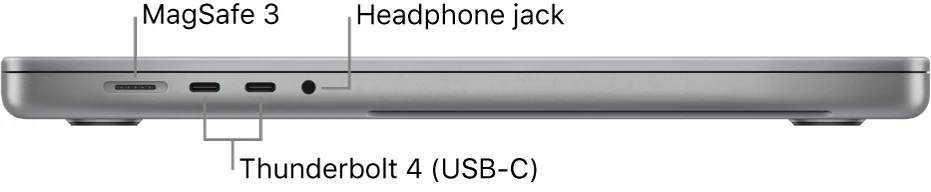
- MagSafe 3; originally supplied 140 W USB-C adapter
- Ports
- Three Thunderbolt 4, HDMI, SDXC and headphone jack
The larger workspace must earn the larger computer
The 2021 16-inch MacBook Pro is most interesting when its built-in display will be used as a real workspace, not merely as a small companion to an external monitor that is always present. A video timeline, a large document or several working panels can benefit from the additional area. That is the practical reason to consider the larger model. Carrying it only to use a much bigger desk display may be a less persuasive trade.
Start by deciding where the work happens and what must remain visible at once. Then identify the chip, memory and storage that fit those tasks. This review examines the documented configuration range and the ownership implications of buying an older workstation. It does not claim measured export speed, screen accuracy or battery endurance, and it does not treat every used 16-inch Pro as an equivalent machine.
The display is both a tool and an expensive condition check
Apple specifies a 16.2-inch Liquid Retina XDR display with adaptive ProMotion. The screen can provide a useful self-contained working area, but brightness claims need their conditions attached. HDR and SDR specifications are different, and a peak number should not be treated as the normal output of every document or application. Evaluate the content and lighting relevant to the job rather than comparing detached headline figures.
Inspect the used panel carefully with neutral backgrounds and familiar material. Look for marks, uneven illumination and physical damage near the edges. Check the hinge and examine whether the lid has been bent or struck. A workstation purchased partly for its display should not begin with a panel fault dismissed as minor because it is less visible on a colourful wallpaper. Repair costs and inconvenience belong in the value calculation before the transaction is final.
M1 Pro versus M1 Max needs an actual workload
The chip options are not simply different badges. They affect graphics resources, memory possibilities and external-display arrangements. A buyer should identify which parts of the workload need those capabilities before paying more for M1 Max. If the work does not use them, money may be better directed toward sufficient memory, storage, a healthier battery or stronger seller protection.
Inspect the configuration directly in the computer's information, then run representative work while a return is possible. Use the actual project dimensions, source media and plug-ins rather than a small demonstration file. We have not benchmarked these configurations, so no claim is made about the time a particular export will take. The point is to choose a documented hardware arrangement that fits the job, then verify that the software and real project behave acceptably on the example being purchased.
Memory and storage need working margin
The documented memory range depends on the chip, with the largest options associated with M1 Max. Think about what stays open simultaneously, including browser tools, communication applications and background services. A large screen often encourages keeping more material visible, but visibility does not eliminate the resources needed to work with it. Choose capacity according to the complete routine rather than the minimum needed to launch the main application.
Storage planning should include source files, temporary work, caches and backups. A large internal drive can make mobile work simpler, but it is not the only place important material should exist. If external storage is part of the setup, test its connection and include it in the carry plan. An older workstation becomes attractive when it supports real work with fewer interruptions, not when a low purchase price creates repeated capacity-management chores.

Direct connections support a mobile workstation
The combination of HDMI, SDXC, three Thunderbolt 4 ports and MagSafe charging can reduce the number of adapters needed in the field. That is useful for a photographer ingesting cards or a creator connecting a display at a temporary workspace. The benefit should be tied to actual equipment: card format, display inputs, storage and audio devices all deserve compatibility checks.
Test each connection that matters rather than assuming a port is healthy because it looks undamaged. Read a card, move a file and connect a display with the intended cable. For a multi-monitor desk, consult the exact chip's supported combinations; M1 Pro and M1 Max do not have identical limits. A successful workstation setup is the whole arrangement working together, including sleep and reconnection, not merely a laptop with an impressive number of sockets.
Portability includes the charger and the workspace
The 16-inch format deserves a trial in the bag and on the surfaces where it will be used. A broad screen may be welcome at a hotel desk and awkward on a small tray or narrow café table. Include the power adapter, cable, drives and other essential equipment when judging the load. The laptop's isolated weight is only part of what the owner carries.
Apple's original configuration included a substantial charging supply, and a used listing should clearly state what accompanies the computer. Verify that the provided equipment supports the desired routine rather than relying on an arbitrary USB-C charger that happens to connect. A portable workstation can be worthwhile even when it is not the lightest option, but the added capability should be used often enough to justify the physical commitment.
Battery capacity is not battery condition
The original design's 100 Wh battery specification is useful context, but it does not describe the capacity or behavior of a particular used battery. Ask about health information and service history, and test a realistic session away from power. An advertised playback duration cannot predict a demanding editing day or compensate for years of wear. Obtain a current service quote if maintenance appears likely.
Inspect the keyboard, trackpad, camera, microphones and speakers as well. Complete a normal account setup after the seller removes personal and organizational control, and verify current application requirements. Specialist plug-ins and peripherals should be checked individually before migration. A former professional machine may have been used intensively or managed by a business; neither is automatically a problem, but unresolved management restrictions and unclear repair history should not become the next owner's responsibility without a deliberate decision.
A large older Pro for work that benefits from it
The 16-inch 2021 Pro can be a compelling purchase for someone who needs substantial built-in screen area and a configuration suited to creative or technical work. It is less convincing if most tasks are light or if the machine will spend nearly all its time closed beneath an external monitor. In those cases, other formats may deliver the required work with less cost or carrying burden.
Our provisional score rewards the documented workstation design while leaving measured performance and reliability unclaimed. We would prioritize a healthy display, correct memory and storage, a credible battery situation and successful testing of the complete workflow. Compare the final cost after power accessories and potential service with newer alternatives. The larger Pro is most satisfying when its screen and connections solve recurring problems, rather than when its former flagship status is asked to justify a machine that is inconvenient to own.
Sources & further reading.
These are the sources behind this research review. Manufacturer claims are not independent performance measurements. Community accounts, when cited, describe individual experiences.
Documentation reviewed: 9 October 2026. Product software and regional bundles can change. Corrections and editorial disclosures.