An editorial assessment of documented capabilities and ownership trade-offs. This is not a hands-on test result or a measurement of reliability.
Features & capability 30%8.5
Three documented rear views and extensive capture controls provide flexibility; results are untested.
Compatibility & connectivity 20%8.4
Current connection standards are broad, with regional carrier and accessory checks still required.
Ownership & upkeep 20%8.2
The published update policy strengthens planning; physical repair and battery ageing remain separate questions.
Setup & everyday use 15%7.9
Assisted features offer possibilities while adding account, permission and regional decisions.
Documentation & support clarity 15%8.6
The specification table distinguishes sizes, charging and configurations, with explicit feature conditions.
Compare scores within the same product category. Small decimal differences should not override your needs or the evidence limits.
How the Standpoint Score works
We score five aspects of the documented product on a 0–10 scale, then calculate a weighted total:
- Features & capability30% of the total
- Compatibility & connectivity20% of the total
- Ownership & upkeep20% of the total
- Setup & everyday use15% of the total
- Documentation & support clarity15% of the total
This product’s 8.3/10 is a provisional research assessment. It does not claim measured performance, tested reliability or a verified customer satisfaction rate. Compare it with products in the same category, and read each criterion’s reasoning above.
Read the full rubric and score bands ↗The ownership case.
An appealing documented fit for someone wanting a smaller premium Android phone and a long update policy, with camera consistency and assisted workflows still needing hands-on evaluation.
Reasons to consider it
- Separate telephoto camera
- Published seven-year update commitment
- Wired and magnetic wireless charging options
Go in knowing
- Software functions have regional and account conditions
- Storage choices include different RAM configurations
- Charging claims need compatible equipment
The specification sheet.
Published specifications from the linked sources. Configurations and availability can differ by country.
- Display
- 6.3-inch LTPO OLED; 1–120 Hz
- Processor
- Google Tensor G6
- Rear cameras
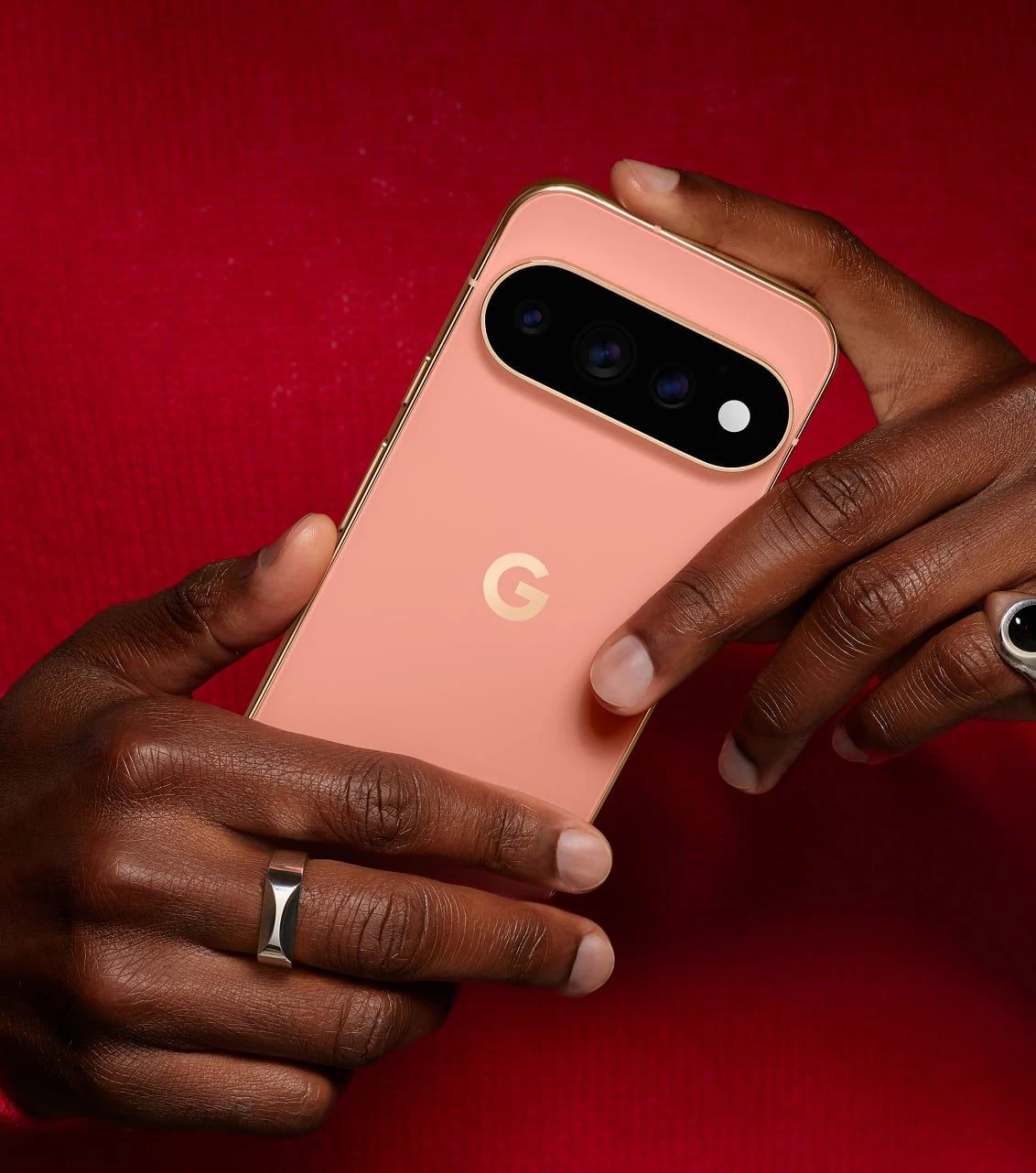
- 50 MP wide, 48 MP ultrawide, 48 MP 5x telephoto
- Wireless charging
- Pixelsnap, Qi2.2-certified; up to 25 W advertised
- Updates
- Seven years of OS, security and Pixel Drop updates
A compact flagship with a software-heavy proposition
The Pixel 11 Pro is interesting because its buying case combines a manageable flagship size with an unusually prominent software layer. Google presents photography, assistance and communication as closely connected functions. That can be useful for a buyer already using Google's services, but the evaluation should begin with actual tasks. A phone that helps organise a trip is valuable only if the information is correct and the user can understand what it has done. A longer list of features is not the same thing as a less demanding day.
Our focus is the regular Pro, rather than the larger Pro XL. Google's published specifications distinguish the two sizes, charging conditions and batteries. We use those distinctions to assess the fit of the smaller phone. We have not measured camera quality, network reception, heat or endurance, and do not claim the research score predicts those outcomes. The central question is whether the documented hardware and software offer a coherent ownership package for someone who wants a premium Android phone without defaulting to the largest display.
The screen and storage configuration deserve separate decisions
Google specifies a 6.3-inch LTPO OLED display with refresh behaviour spanning 1 to 120 Hz. That is a broad documented range, but perceived smoothness still depends on the application and settings. The useful shopping exercise is to try reading, typing and framing a photograph at the intended text size. A compact screen can be easier to carry while requiring more scrolling in a spreadsheet. Decide which inconvenience matters more before letting an impressive peak-brightness claim settle the choice.
The storage configurations also carry memory differences in Google's table. That makes this more than a simple choice about how many photographs to retain. Compare the exact configuration, then calculate the space needed for offline media, games and local video projects. Cloud backup does not eliminate local working-space requirements, and it may add a recurring cost. Someone who travels with patchy connectivity should budget for the files they want available without a connection. We would avoid choosing the lowest configuration solely because a promotional checkout price looks appealing.
Three cameras create useful framing options
The documented rear system includes wide, ultrawide and a 5x telephoto camera. These provide distinct ways to frame a scene. The telephoto is potentially useful when moving closer is impossible, while an ultrawide can help in a small interior. Neither choice establishes the quality of a finished image. We would want to inspect moving subjects, difficult lighting and transitions between cameras before calling the system consistently dependable. A sharp photograph of a static building cannot answer how it handles an excited child in a dim room.
Google also promotes substantial software processing and editing options. Treat capture and editing as different decisions. A photograph intended as a record of a condition or event should preserve what was observed. A creative image can have a different purpose, provided the changes are understood. Before adopting an automated workflow, keep the original file and check the result at a normal viewing size. The ability to remove a distraction can be convenient, but it does not replace careful composition or make every processed image an accurate record.
Assistance is most useful when its actions are visible
The phone's intelligent features should be judged by the friction they remove and the opportunities they provide to check results. Begin with low-stakes, repeatable tasks: locating a booking, drafting a shopping list or helping organise an already agreed plan. Notice whether the feature asks for clarification, exposes the information it used and allows correction. An assistant that produces a polished answer from incomplete context can add work if the user must reconstruct the missing assumptions later.
Regional availability, language support, accounts and service terms can change the practical package. A Canadian purchaser should not assume that every demonstration on the US storefront represents a function available in the same form at home. Likewise, an introductory service offer should be separated from what remains included after the offer ends. We would assess the ordinary paid and unpaid configurations independently. The ownership case is stronger when a useful function continues to work within a clear, predictable arrangement than when the best experience depends on a temporary entitlement.
Pixelsnap and charging are a system to verify
Google lists Qi2.2-certified Pixelsnap wireless charging up to 25 W for the Pro and specifies a compatible USB-C PPS power source for its wired charging claim. Those details matter when reusing an existing charger. Connector shape does not establish that a power supply provides the required charging behaviour. Check the adapter, cable and accessory documentation together, and do not assume that every magnetic stand will deliver the advertised maximum or fit comfortably with a chosen case.
Wireless charging can simplify a desk routine, while a wired supply may be more convenient during a short stop. The better choice depends on how the phone is used, not on which accessory looks tidier in a product photograph. We would check alignment, temperature and charging behaviour with the actual setup before praising its convenience. Google's stated battery duration remains a manufacturer claim. It cannot tell us how long the phone lasts during navigation, tethering, filming or an extended period on a weak cellular signal.
Updates are valuable, but service still matters
Google publishes seven years of OS, security and Pixel Drop updates. That is a useful planning commitment, although buyers should read the policy's starting point and conditions. A software support period is not a warranty for every physical component. Battery replacement, accidental damage, parts availability and local repair arrangements remain separate ownership questions. The strongest long-term proposition combines maintained software with a practical way to keep the hardware useful.
For a North American buyer, check the exact model against the intended carrier and confirm the service channel before importing a phone. A familiar product name does not settle radio configuration or warranty handling. Keep purchase records and make sure authentication methods are recoverable if the phone needs service. We would also ask a seller of used hardware about battery behaviour and account removal. A long update promise is less helpful if the device arrives with an unresolved activation problem or a physical fault that cannot be serviced economically.
Moving in without handing every app every permission
Set up the phone around the applications you actually need. A migration can bring over years of unused software and noisy notification settings. Start with calls, messaging, calendar, maps and essential authentication, then add other services deliberately. Check each application's access to location, photographs, contacts and microphone. The aim is not to disable useful functions indiscriminately; it is to understand which access supports which job and retain control over the rest.
Google's security features should complement that routine. No marketed protection eliminates the need to recognise a suspicious message or verify a request for an account credential. Keep recovery options current and confirm that backups can restore the information that matters. If the phone will be shared or handed to a child occasionally, investigate the current platform's profile and restriction options before assuming a simple lock-screen code covers the situation. These setup decisions are part of usability and deserve attention alongside the processor and camera list.
The buyer this phone makes most sense for
The Pixel 11 Pro's research proposition is persuasive for an Android buyer who wants telephoto flexibility, a compact flagship screen and a clearly stated software-update commitment. It is a more conditional fit for someone whose main interest is sustained gaming performance, a particular professional recording workflow or the longest possible battery life. Those priorities require measurements and exact app checks that the specification sheet cannot supply. The Pro XL also needs its own assessment rather than inheriting the smaller phone's verdict.
Before ordering, price the intended storage, charging equipment, case and any service subscriptions in Canadian or US currency as appropriate. We would then compare the complete arrangement against keeping an existing phone. Our next evaluation would test repeatable photographs, assisted tasks, network behaviour and several ordinary days of charging. The provisional Standpoint Score recognises the breadth of the documented package while leaving those outcomes open. Its strongest promise is useful integration; the decisive evidence will be whether that integration remains clear and dependable in everyday use.
Sources & further reading.
These are the sources behind this research review. Manufacturer claims are not independent performance measurements. Community accounts, when cited, describe individual experiences.
Documentation reviewed: 9 October 2026. Product software and regional bundles can change. Corrections and editorial disclosures.