A rating from our own use of the product, weighed against its documentation and price.
Features & capability 30%8.8
Strong hard-surface proportions, wear textures, Smart Mesh P2.0 quad retopology and engine skeleton presets when assets are generated as single parts.
Compatibility & connectivity 20%8.6
Exports GLB, FBX, OBJ, USDZ, STL and 3MF for Blender, Unreal, Unity and slicers. Web Studio and API credits are separate.
Ownership & upkeep 20%7.0
Paid private models get full commercial rights and training exclusion, but monthly credits expire with zero rollover and Blender cleanup is still needed.
Setup & everyday use 15%8.2
Fast browser workflow with clear credit pricing per run, though mechanical hinges, doubled lugs and cutaway framing still cause retries.
Documentation & support clarity 15%7.4
Canadian-dollar pricing and credit docs are clear, but headline model counts assume basic runs and refunds close after 24 hours or any credit spend.
Compare scores within the same product category. Small decimal differences should not override your needs or the evidence limits.
How the Standpoint Score works
We score five aspects of the documented product on a 0–10 scale, then calculate a weighted total:
- Features & capability30% of the total
- Compatibility & connectivity20% of the total
- Ownership & upkeep20% of the total
- Setup & everyday use15% of the total
- Documentation & support clarity15% of the total
This product’s 8.1/10 is a hands-on editorial assessment based on our own use and the linked documentation. It is not a laboratory measurement or a long-term reliability rating. Compare it with products in the same category, and read each criterion’s reasoning above.
Read the full rubric and score bands ↗From a tech standpoint.
Tripo Studio Pro has earned a real place in my asset pipeline. When I stopped asking it for an entire rigged excavator in one shot and started prompting individual parts like the cab, undercarriage, boom and five-tooth bucket, it saved hours of initial blocking. Still, it is a starting point, not an export-and-ship machine: rough end lugs, doubled pin ears and baked underside shadows still go straight into Blender for cleanup. Start with the free 200 credits, test one monthly Pro plan at CA$28 before touching a two-year deal, and watch the 24-hour zero-credit refund rule.
Reasons to consider it
- Clean hard-surface silhouettes and believable wear textures when prompted as single, well-defined parts
- Smart Mesh P2.0 quad retopology and engine skeleton presets save real setup time over raw triangle soup
- Exports GLB, FBX and OBJ for game engines alongside watertight STL and 3MF files for 3D printing
- Paid tiers keep private models commercial-ready and excluded from training, with Canadian-dollar pricing on the web checkout
Go in knowing
- Complex mechanical hinges, pin ears and small bolts still melt or double up, so Blender cleanup is part of the job
- High-poly runs bake ambient shadow into underside textures unless you strip or repaint the albedo map
- Monthly credits never roll over, even on annual or two-year Black Friday plans, and Web Studio and API credits are billed separately
- Refunds are limited to 24 hours with zero credits spent, which leaves no room to test a paid tier risk-free
- Headline "200 models" Pro claims reflect basic runs; 45-credit high-detail runs plus retopology and retries burn credits much faster
Affiliate link. Tech Standpoint may earn a commission if you purchase through it. It never changes our verdict or score. Disclosure
The specification sheet.
Published specifications from the linked sources. Configurations and availability can differ by country.
- What it is
- Web studio (Tripo Studio) and API for text-to-3D and image-to-3D mesh generation, retopology, texturing and rigging
- Export formats
- GLB, FBX, OBJ, USDZ, STL and 3MF
- Topology & rigging
- Smart Mesh P2.0 quad retopology (500 to 50,000 faces); UE5 Mannequin, Unity Humanoid, Mixamo, VRM 1.0 and ActorCore presets
- Canadian pricing (Nov 26, 2026)
- Free CA$0 (200 credits); Pro CA$28/mo, CA$168/yr, or CA$302.40 for 2 yrs in Black Friday sale (3,000 credits/mo); Max CA$124/mo or CA$596/yr (25,000 credits/mo)
- Credit cost seen in my use
- 45 credits per 500,000-triangle model in my pilot batch; Smart Mesh P2.0, extra texture passes and rigging cost extra
- Credit rollover
- None; unused monthly subscription credits expire at the end of each billing month, including on annual plans
- Refund policy
- Within 24 hours of purchase only, and only if zero credits from that purchase have been used
- Commercial rights
- Paid plans own private outputs; Free plan outputs belong to Tripo under CC BY 4.0 non-commercial terms
- AI training policy
- Paid-plan generations are excluded from model training according to Tripo documentation
What you're paying for
Tripo 3D is a browser-based 3D generator (`studio.tripo3d.ai`) that turns text prompts or reference photos into textured 3D meshes, then adds retopology, UV unwrapping, auto-rigging and animation tools on top. Unlike general image or video apps, Tripo aims directly at people putting assets into Unreal Engine, Unity, Blender or a 3D printer slicer.
I have been using a paid Tripo Studio Pro account on my own project, generating more than 60 heavy-equipment and site-prop sub-assemblies over November 2026. Tripo did not give me free credits, sponsor this piece or see it before publication. Everything below comes from what actually came out of my workspace and what Tripo publishes in its terms and pricing docs.
The short answer is that Tripo is past the gimmick stage for hard-surface blocking, as long as you treat it like a fast junior modeller rather than a finished-asset button. Give it one clear component with tight constraints, and you get something worth bringing into Blender. Ask for a whole articulated machine at once, and you get a fused statue you cannot animate.
What I built on my own Pro account
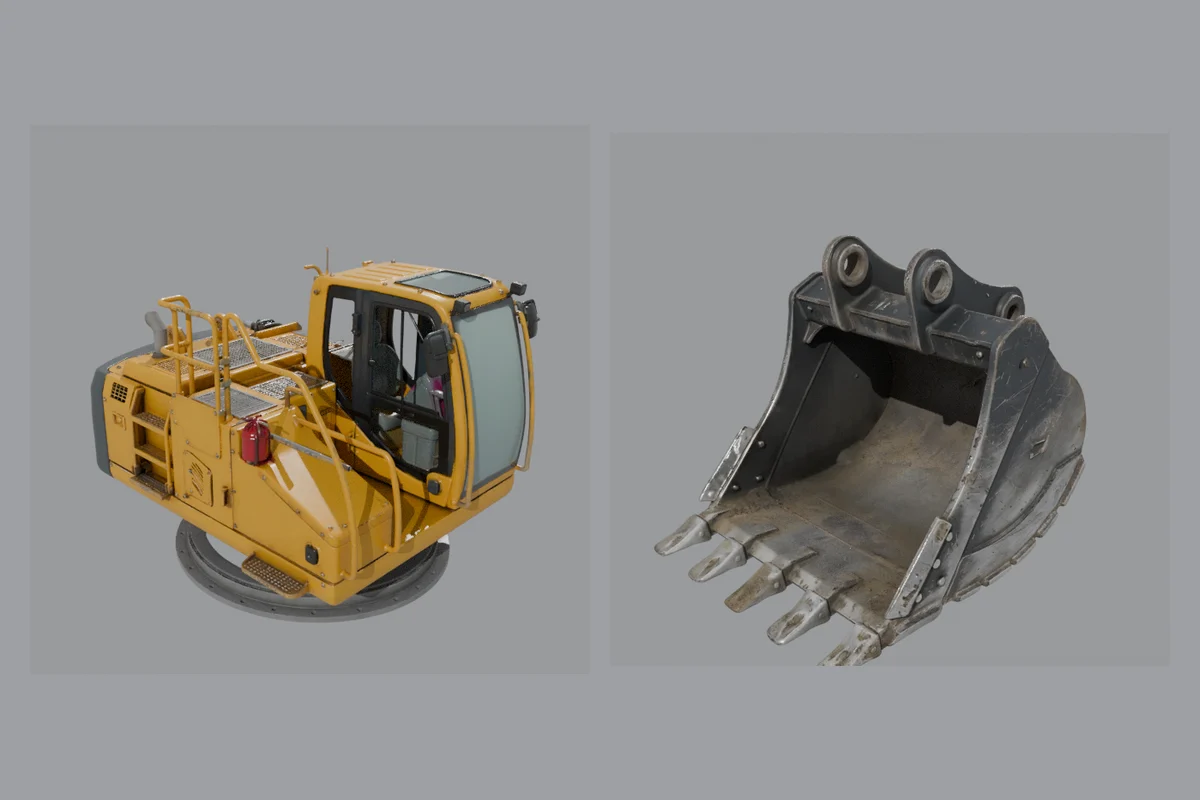
My main test was a six-part pilot run for a 20-tonne excavator and tandem truck setup. Instead of prompting "a whole excavator", I wrote strict studio-photo prompts for each moving assembly on its own: the upper cab and counterweight sitting on its slew ring, the crawler undercarriage below it, a detached banana boom, a five-tooth digging bucket, a cutaway cab interior and a bare tandem truck chassis.
Every one of those six high-detail runs was set to a 500,000-polygon target (Tripo accepted values from 500 up to 2,000,000) and cost 45 credits each, taking 270 credits in total out of a 12,905-credit balance. In my workspace, those raw GLB exports landed between 441,011 and 473,251 triangles and roughly 16.9 MB to 18.5 MB per file.
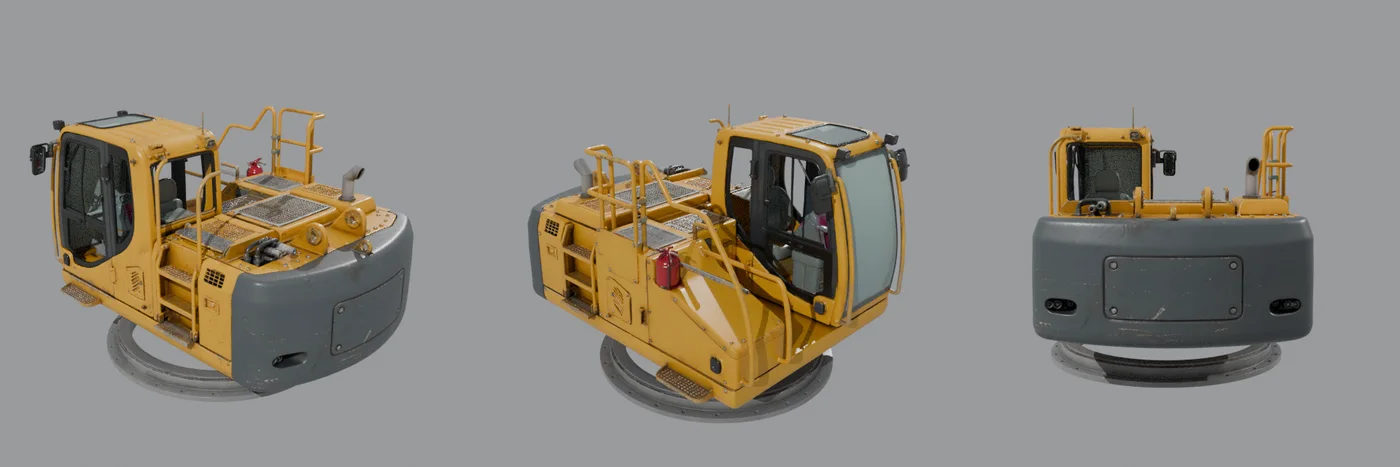
Splitting the machine changed everything. The upper house came back with the cab in the right spot, safety-yellow paint, mesh engine-deck walkways, handrails, exhaust stack, boom mounting lugs and a clean round slew ring with no stray tracks attached. The undercarriage gave me twin triple-grouser tracks, drive sprockets, idlers and an X-frame below the ring. Having those as separate GLBs meant I could rig real hydraulic pivots and slew rotation inside Unreal Engine 5 instead of starting from a frozen brick.
Across the rest of the yard, Tripo handled single-purpose industrial shapes well: a quarry rock crusher, galvanized storage silos, a conveyor belt, a padfoot roller drum, a dump box and an operator seat. When a shape has a strong, recognizable silhouette and clear surface materials, Tripo nails the rough proportions quickly.
Where the meshes work, and where they cheat
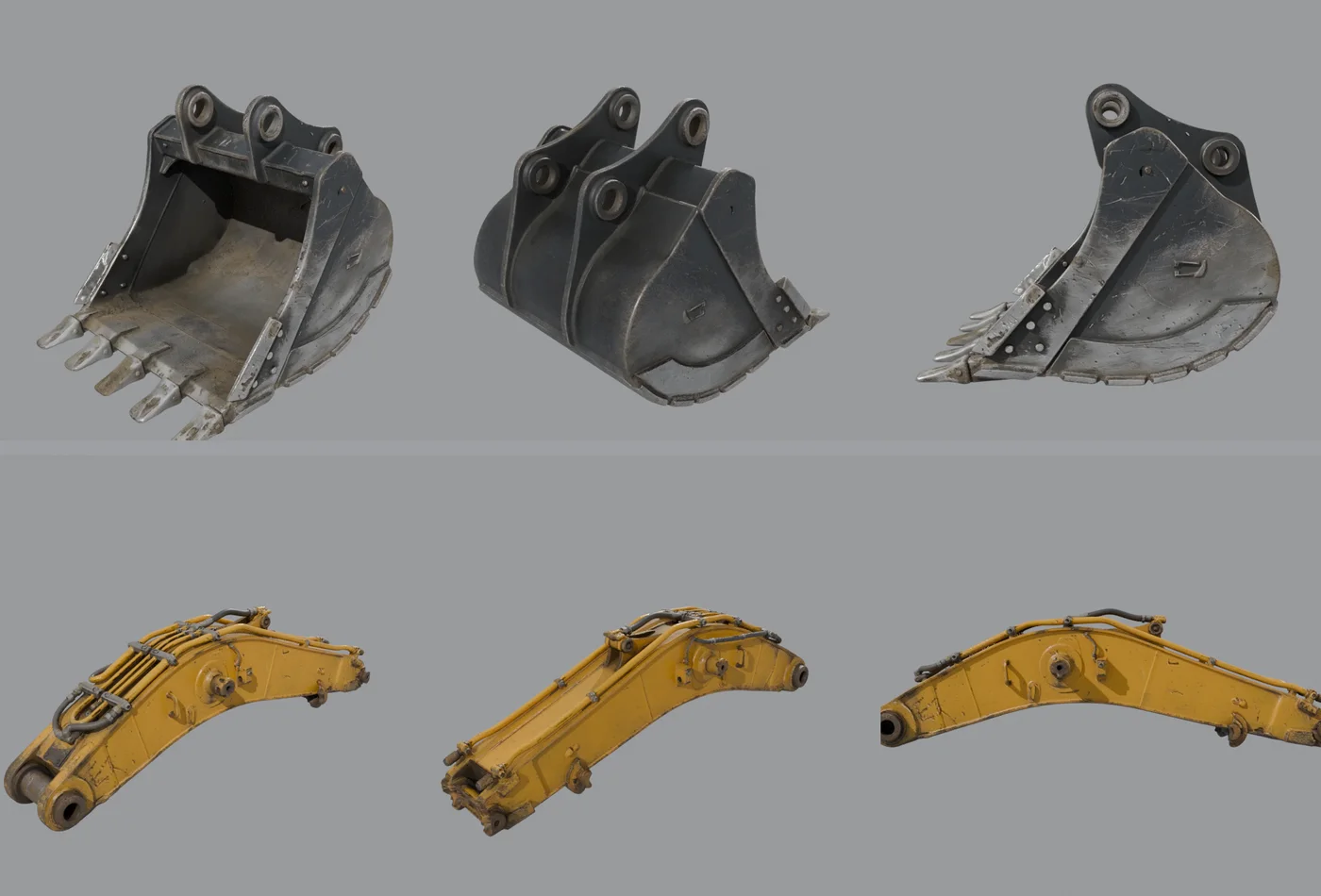
Looking at the three-angle sheets from that six-part run shows exactly where Tripo earns its keep and where you still pay the cleanup tax in Blender. None of the six parts dropped straight into production untouched.
The digging bucket looked great at arm's length: curved steel shell, five replaceable teeth on adapters, side cutters, wear strips underneath and scratched bare metal inside the open mouth. Zoom in on the top, though, and Tripo gave it four pin-ear bosses instead of two. The first banana boom had the right curve and clamped hydraulic pipes along its spine, but the hinge lugs at the foot came out cluttered and partly melted, forcing follow-up v2 and v3 retries before the pin bosses made mechanical sense.
Two other catches came up repeatedly across my 60-plus assets. First, lighting leaks into textures: on the tandem truck cab and frame, Tripo baked dark contact shadows under the body directly into the colour map, so you need to toggle lighting removal or repaint the albedo before putting the mesh under dynamic game sunlight. Second, interior cutaways are unpredictable. When I prompted an excavator cab with the left wall and roof removed so the joysticks and pedals would be clearly visible, Tripo kept the roof and rear wall and only opened one side.
Up close on small hardware like track-frame bolts and hydraulic fittings, surfaces also go slightly mushy at 450,000 triangles. From a player's chase camera or cab seat that wear reads fine; from a hero close-up you notice it.
Quad topology, game engines and 3D printing
Raw high-poly exports are triangle soup, which is fine for static kitbashing or high-res renders, not for deformation or tight frame budgets. Tripo's answer is Smart Mesh P2.0, which retopologizes meshes into cleaner quad-dominant layouts between 500 and 50,000 faces, alongside automated UV unwrapping and skeleton presets for Unreal Engine 5's Mannequin, Unity Humanoid, Mixamo, VRM 1.0 and ActorCore.
In r/Tripo_ai and r/aigamedev, developers testing Tripo alongside Meshy report a consistent split: Smart Mesh P2.0 holds hard-surface vehicle and prop silhouettes noticeably better than standard decimation, though automated UVs and low-poly character silhouettes still need manual touch-ups before shipping. Think of Smart Mesh as saving the first 80% of retopology work, not replacing a final pass in Blender.
On the 3D-printing side, Tripo exports straight to STL and 3MF, which means you can drop a generated part onto a build plate for a Bambu Lab P2S or similar printer without hunting for converters. Still, community builders in r/3Dprinting and r/Tripo_ai point out the same rule I hit with game meshes: inspect the sliced preview first. Thin handrails, hollow teeth or floating bits can slice as non-manifold shells or snap off the bed unless you thicken or repair them in Blender or your slicer beforehand. Look at our Bambu Lab P2S review if you want to see how those slicer checks play out on a real print: Bambu Lab P2S Combo (AMS 2 Pro) review
Canadian pricing and the credit maths
Checked on my account on November 26, 2026, Tripo Studio shows Canadian-dollar pricing right in the upgrade screen. Free gives 200 monthly credits (which Tripo calls roughly 13 models). Pro is CA$28 a month billed monthly, CA$168 a year (CA$14/month), or CA$302.40 for 24 months during Tripo's Black Friday sale running until December 4, for 3,000 monthly credits. Max jumps to CA$124 a month, CA$596 a year, or CA$1,041.95 for two years (25,000 monthly credits plus two bonus months during the promo).
Do the credit maths before you look at the "200 models" badge on Pro. That figure assumes basic 15-credit runs. In my pilot batch at 500,000 triangles, each generation cost 45 credits, which puts 3,000 Pro credits at about 66 high-detail parts before any retries. Add Smart Mesh P2.0 retopology (which Tripo's docs put around 100 credits on P2.0), AI texturing or rigging passes, and a single finished, retry-tested hero asset can easily run 120 to 200 credits. On Max, CA$596 a year drops the per-credit rate sharply if you generate assets every week, while casual users will leave most of 25,000 credits on the table.
One big billing detail: Tripo's own credit documentation states that Web App Studio credits and API credits are kept completely separate. Paying for a Pro or Max Studio subscription does not give you API credits to call from scripts.
Commercial rights, training data and the 24-hour refund trap
On ownership and privacy, Tripo draws a hard line between Free and paid tiers. On the Free plan, outputs stay under CC BY 4.0 non-commercial attribution terms and Tripo keeps intellectual property rights. Once you move to Pro, Max or Team and keep your generations private, Tripo grants full commercial ownership for games, client work and selling 3D prints, and its documentation states that paid-plan assets are not used to train its models.
The two traps sit in the billing terms. First, there is zero monthly credit rollover: unused subscription credits expire at the end of every monthly cycle, even when you pay upfront for a 1-year or 2-year Black Friday plan. If a busy project wraps up and you go two months without opening Tripo, those months of credits simply vanish.
Second, Tripo’s refund help page limits refunds to accidental purchases requested within 24 hours, and only when zero credits from that purchase have been used. Spend even 15 credits testing a prompt on a paid tier and that purchase is locked in.
Who should pay for it
Pay for Tripo Pro if you already know Blender or a slicer and want to skip blank-canvas modelling on props, terrain clutter, rough vehicle parts or custom tabletop prints. Breaking complex builds into separate parts and cleaning up the odd melted hinge or doubled pin ear lets you move much faster than hand-modelling from scratch, while keeping costs predictable in Canadian dollars.
Skip the big annual or two-year commitment until you have proved your workflow. Burn through the free 200 credits on your toughest real part first, then buy a single CA$28 month to see how many credits your actual retry rate takes. Only grab the CA$168 yearly plan or the Black Friday two-year deal if you know you will keep generating parts month after month.
The closest alternatives.
| Product | Standpoint Score | Best for | Price |
|---|---|---|---|
| Tripo 3DThis review | 8.1Tested | Indie game developers, 3D-printer makers and hobbyists who want fast base meshes to clean up in Blender, and who will… | studio.tripo3d.ai ↗ |
| Higgsfield AI | 6.2Research | Creators who switch between several AI video and image models every week, will pay for credits rather than chase… | higgsfield.ai ↗ |
| OpenArt | 8.3Tested | Creators who make AI video regularly, want every major model in one place, and will stick to the core generators rather… | openart.ai ↗ |
| Google Gemini 4 Argon | 7.9Research | Research, long documents, finance and legal-style analysis, and developers who send very long prompts, especially… | Amazon.ca ↗ |
Compare scores within a category: Tested means our own use, Research means documentation and attributed outside testing. Price links are affiliate links. As an Amazon Associate, Tech Standpoint earns from qualifying purchases. Disclosure
Questions before checkout.
Is Tripo 3D worth paying for?
For indie devs, kitbashers and 3D-printer hobbyists who do basic cleanup in Blender, yes. I score it 8.1 out of 10 from generating over 60 hard-surface parts on a paid Pro plan: proportions and single parts save real time, though hinges still need cleanup and unused credits expire every month.
How much does Tripo Studio cost in Canada?
Checked November 26, 2026: Free is CA$0 (200 credits/month, non-commercial). Pro is CA$28/month, CA$168/year, or CA$302.40 for two years in the Black Friday sale running until December 4 (3,000 credits/month). Max is CA$124/month or CA$596/year (25,000 credits/month).
Do unused Tripo monthly credits roll over?
No. Tripo states that monthly subscription credits expire at the end of each monthly cycle and do not roll over, even if you pay upfront for a 1-year or 2-year plan.
Can you 3D print models straight from Tripo 3D?
Tripo exports STL and 3MF directly, so models open straight in Bambu Studio or other slicers. Expect to inspect thin details and check for non-manifold shells in your slicer or Blender before printing.
Can I get a refund if Tripo does not work for my project?
Only within 24 hours of purchase and only if zero credits have been used. Once you generate a model on a paid purchase, it is no longer eligible for a refund.
Sources & further reading.
The documentation and outside reporting referred to in this review. Specifications are manufacturer claims; everything else in the review is from our own use unless attributed.
- Tripo 3D: Plans and pricing ↗manufacturer
- Tripo Studio web application ↗manufacturer
- Tripo Docs: Pricing and credits ↗support
- Tripo Help: Refund policy ↗support
- Tripo: Terms of Use ↗manufacturer
- Tripo: Smart Mesh overview ↗manufacturer
- r/Tripo_ai: Is Tripo AI worth paying for as a game developer? ↗Community discussion
- r/Tripo_ai: Testing Tripo AI for 3D printing ↗Community discussion
- r/aigamedev: Tripo results and topology feedback ↗Community discussion
Product software and regional bundles can change. Corrections and editorial disclosures.
Affiliate link. Tech Standpoint may earn a commission if you purchase through it. It never changes our verdict or score. Disclosure