A rating from our own use of the product, weighed against its documentation and price.
Features & capability 30%8.6
Good 12 MP camera, clear calls and usable open-ear music in one pair of prescription sunglasses. No display, and audio cannot match sealed earbuds.
Compatibility & connectivity 20%8.0
Pairs with a phone through the Meta AI app and handled music and calls without fuss. The experience depends on a Meta account and Meta's services.
Ownership & upkeep 20%7.6
The battery has never run out on me and the case recharges it. Cloud voice storage by default, prescription lenses tied to one wearer and the newer Gen 3 weigh on long-term value.
Setup & everyday use 15%9.0
Effortless to wear and use: four-hour outings leave me about 40% battery, and calls, music and photos need no phone in hand.
Documentation & support clarity 15%7.8
Specifications are clear, but privacy terms have changed over time and some AI features roll out by region or as early access.
Compare scores within the same product category. Small decimal differences should not override your needs or the evidence limits.
How the Standpoint Score works
We score five aspects of the documented product on a 0–10 scale, then calculate a weighted total:
- Features & capability30% of the total
- Compatibility & connectivity20% of the total
- Ownership & upkeep20% of the total
- Setup & everyday use15% of the total
- Documentation & support clarity15% of the total
This product’s 8.2/10 is a hands-on editorial assessment based on our own use and the linked documentation. It is not a laboratory measurement or a long-term reliability rating. Compare it with products in the same category, and read each criterion’s reasoning above.
Read the full rubric and score bands ↗The ownership case.
The Gen 2 works best when it replaces glasses you would wear anyway. As prescription sunglasses it adds music, clear hands-free calls and a genuinely good camera with almost no effort, and the battery has never run out on me. Meta's newer Gen 3 and its data policies are the two reasons to pause: buy the Gen 2 at a discount, and read the privacy settings on day one.
Reasons to consider it
- Four-hour outdoor sessions leave me about 40% battery
- Callers say they can hear me clearly
- 12 MP camera produces detailed, natural-looking photos in daylight
- Prescription lenses make it a pair of glasses you actually wear, not a gadget
Go in knowing
- Meta released the Gen 3 in September 2026; Gen 2 value depends on discounts
- Meta stores voice recordings in the cloud by default and changed its policy in 2025
- Open-ear speakers are audible to people nearby in quiet places
- Prescription lenses tie the frame to one wearer and add cost
The specification sheet.
Published specifications from the linked sources. Configurations and availability can differ by country.
- Camera
- 12 MP ultrawide; video up to 3K (manufacturer)
- Battery
- Up to 8 hours typical use; charging case adds up to 48 hours; 50% in about 20 minutes (manufacturer)
- Audio
- Open-ear speakers; five-microphone array
- Storage and rating
- 32 GB; IPX4 splash resistance
- Weight
- About 52 g for the standard Wayfarer (reported)
- Lens options
- Clear, sun, polarized, Transitions and prescription
- Canadian price
- From about $519 CAD before prescription lenses at launch; our prescription pair was about $800 CAD
- Our pair
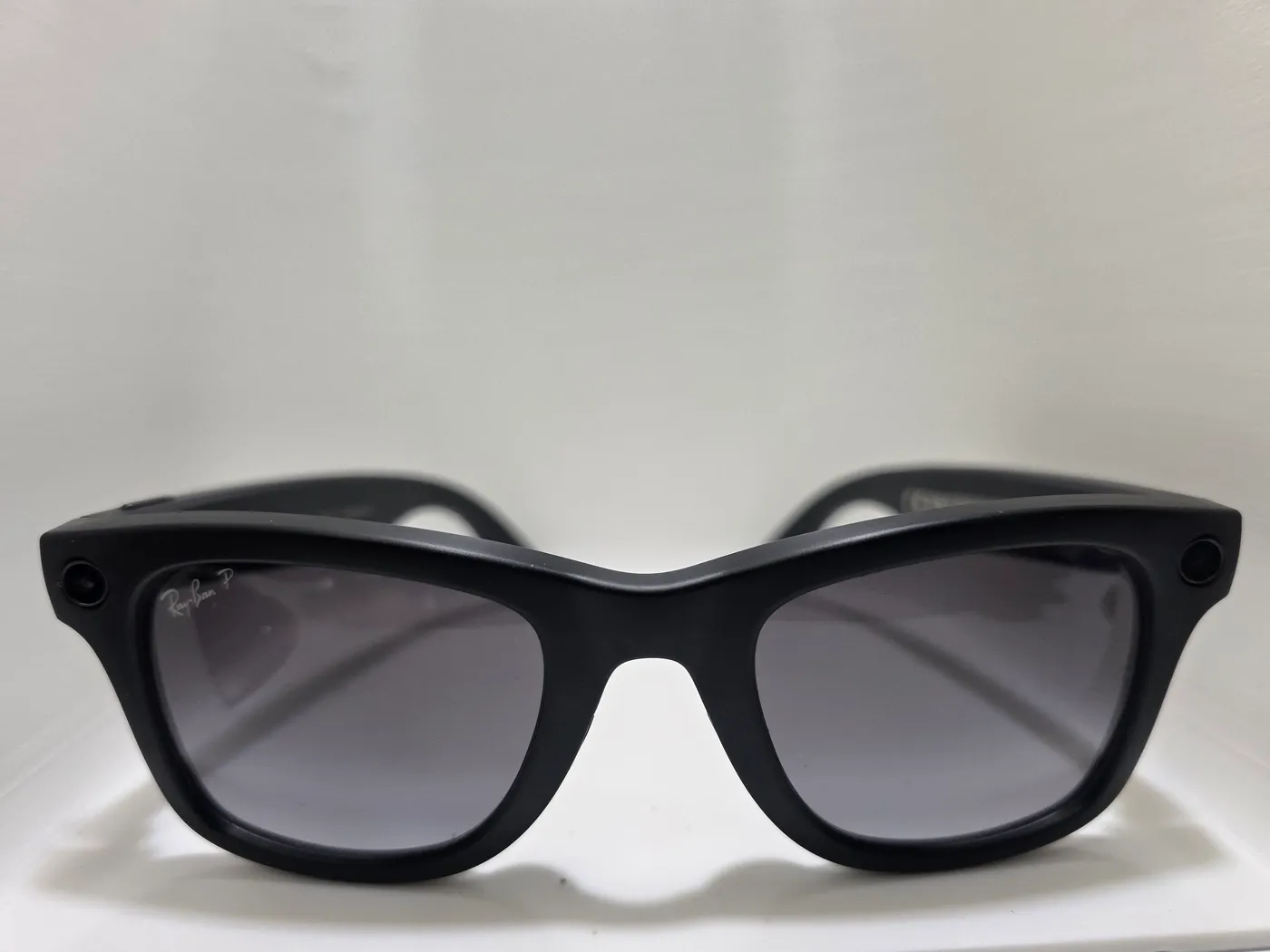
- Wayfarer, matte black, prescription polarized gradient lenses
Why prescription changes the whole review
I bought these Ray-Ban Meta Gen 2 glasses outright from an optical store, fitted with my prescription in polarized gradient lenses. The total came to about $800 CAD, with the lenses covered by my employee benefits plan. Meta and Ray-Ban did not supply the glasses or see this review.
That buying route matters more than any specification. Most smart-glasses reviews treat the product as a gadget you put on for a test. Mine are prescription sunglasses that I wear every time I go outside. That is the best case for this product category: the technology rides along on something you would wear anyway, so you never have to decide to bring it.
For Canadian buyers with vision coverage, it also changes the price. Meta lists the Gen 2 from about $519 CAD before prescription lenses. If your benefits cover lenses, the effective cost of turning your next pair of sunglasses into smart glasses can be much closer to the frame price. Check your plan before you order; coverage, lens options and prescription ranges vary.
Everyday use: you stop noticing it
What I value most is how little effort the glasses ask for. Music starts from the frame, calls are answered without reaching for a phone, and photos happen with a press of the capture button. There is no screen to manage and nothing to put in your ears.
The matte black Wayfarer looks like an ordinary pair of Ray-Bans from a few steps away. The two small circles at the corners of the frame, the camera on one side and the capture LED on the other, are the only giveaway. The brown charging case looks like a normal Ray-Ban case and recharges the glasses when you put them away.
Because the glasses are only worn outdoors, they spend most of the day in the case. That pattern suits the battery well, as the next section shows.

Battery: four hours out, about 40% left
The glasses have never run out of battery on me. A typical four-hour outing, mostly music with some calls and photos, leaves about 40% in the glasses. At that pace a full charge would last somewhere around six to seven hours, an estimate from everyday use rather than a timed test.
That sits a little below Meta's claim of up to eight hours of typical use, and it lines up with outside testing. Gizmodo reported that about five hours of loud podcast listening left 15%, and that a 32-minute call used only 4%. Both results point the same way: music and media drain it faster than calls do, and real-world use lands short of the headline figure but well ahead of the first-generation glasses.
The case does the rest. Meta says it holds up to 48 hours of extra charge and can bring the glasses to 50% in about 20 minutes. For someone who wears them outside and stores them in the case indoors, battery has simply stopped being a concern.
The camera is better than it needs to be
Camera quality was one of the first things that won me over. I took the sample in this review with the glasses on an overcast October morning in Ontario. The file's own metadata identifies the camera as Ray-Ban Meta Smart Glasses 2 and the photo as 3024 × 4032 pixels, 12 MP in portrait orientation.
Look at the detail rather than the composition. Individual maple leaves on the deck boards are sharp, the autumn colour is natural rather than oversaturated, and branches against the bright sky hold their edges without heavy halos. The ultrawide view takes in most of what you are looking at, which is the point: it records what you saw, from your eye line, without lifting a phone.
The limits are the ones you would expect. You frame by turning your head, there is no zoom, and the wide lens bends straight lines near the edges. Gizmodo found the Gen 2's 3K video noticeably sharper than the first generation's. I have not tested low light or video in depth yet.

Music on the move and calls people can hear
Walking around town, the open-ear speakers are good enough that they have become my everyday music source outdoors. They will not replace sealed earbuds for bass or for drowning out a bus, but you stay aware of traffic and people around you, which is a fair trade on a sidewalk.
Calls are a highlight. People on the other end tell me they can hear me clearly, which suggests the five-microphone array is doing its job of separating the wearer's voice from street noise. The open speakers do leak: in a quiet room or an elevator, people near you may hear your music or your caller.
I also use the glasses for hands-free calls while driving, much as you would use a Bluetooth earpiece. Ontario allows hands-free calling but bans handheld device use while driving, including at red lights. Treat the glasses as an audio device behind the wheel only: do not take photos, record video or use Meta AI while driving, and check the province's distracted-driving rules yourself.
Privacy: the part to set up on day one
A camera on your face raises two privacy questions, yours and everyone else's. For bystanders, a white LED lights while the glasses record, and Meta says the glasses refuse to record if that light is covered. A 2026 update also stops recording if the LED is covered mid-capture. Be considerate anyway: in shops, gyms and around children, the polite default is not to record.
For you, the bigger issue is Meta's data policy. In April 2025 Meta stopped letting owners opt out of cloud storage of voice recordings, which it may keep for up to a year unless you delete them. Camera-based AI features stay on unless you turn off the wake word. In 2026 Meta also faced a US class action after reports that contractors reviewed private footage. None of this has affected my everyday use, but every owner should open the Meta AI app's privacy settings on day one and decide what to allow.
Gen 2 or Gen 3, and who should buy
Meta announced the Ray-Ban Meta Gen 3 in September 2026, from about $599 CAD for the Wayfarer, with a claimed nine hours of battery and an extra microphone. That makes the Gen 2 last year's model. My experience says the Gen 2 is still plenty: the battery outlasts my outings, calls are clear and the camera is good. Buy it if you find it discounted, or if your optical store and benefits plan make it the easier prescription option.
Buy the Gen 2 if you already wear glasses or sunglasses outside and want music, calls and photos without carrying anything else. Skip it if Meta's data practices bother you, if you mostly need noise isolation, or if you want a display in the lens; that is a different, more expensive product. If you are buying new at full price, compare the Gen 3 first.
Questions before checkout.
How long does the battery last in real use?
For me, a four-hour outing with music, calls and photos leaves about 40%. Meta claims up to eight hours, and the charging case adds up to 48 hours more.
Can you get Ray-Ban Meta glasses with prescription lenses in Canada?
Yes. I bought mine with prescription polarized lenses from an optical store, and my employee benefits plan covered the lenses. Check your coverage and the supported prescription range with the retailer.
Can you use Ray-Ban Meta glasses while driving?
I use them only for hands-free calls, like a Bluetooth earpiece. Do not take photos, record or use AI features while driving, and check your province's distracted-driving rules.
Sources & further reading.
The documentation and outside reporting referred to in this review. Specifications are manufacturer claims; everything else in the review is from our own use unless attributed.
- Meta — Ray-Ban Meta Gen 2 announcement (camera, battery) ↗manufacturer
- Meta Canada — Ray-Ban Meta Wayfarer Gen 2 ↗manufacturer
- MobileSyrup — Ray-Ban Meta Gen 2 Canadian pricing and specifications ↗community
- Gizmodo — Ray-Ban Meta Gen 2 review ↗community
- Engadget — Ray-Ban Meta (2nd gen) review ↗community
- TechCrunch — Meta's April 2025 privacy policy change for Ray-Ban Meta ↗community
- 9to5Google — Capture LED loophole update (August 2026) ↗community
- iPhone in Canada — Ray-Ban Meta Gen 3 Canadian pricing (September 2026) ↗community
- Government of Ontario — Distracted driving rules ↗support
Product software and regional bundles can change. Corrections and editorial disclosures.